


Jodie is an AI receptionist that answers questions about your WooCommerce shop. She tells callers where their order is, once she has checked it is theirs. She gives live prices, stock and delivery costs. After the call, she adds a private note to the order with what the caller wants.
- Tells callers where their order is
- Live prices, stock and delivery costs
- A private note on the order after each call
How does Jodie work with WooCommerce?
Jodie reads your shop while the call is on. She never changes an order. Your team does that.
- 01
A customer calls
They want to know where their order is, or if you have a hoodie in their size. Jodie picks up.
- 02
Jodie checks it is them
She asks for their name. Her server only shows her an order when that name is on it, along with the number they call from or the order postcode.
- 03
Jodie answers from your shop
She gives the order status, the items and the tracking number. She checks live prices, stock and delivery costs.
- 04
Your team picks it up
A return, a change or a problem becomes a private note on the order. Your team acts on it in WooCommerce.
What does Jodie read and write in WooCommerce?
Jodie reads what a call needs while it is on. The only thing she writes is a private note on an order.
Order
Read during a call, only once the caller is matched to it. Their 5 latest orders, or one in full.
- Order number
- Status, in plain words
- Items
- Total
- When it was placed, paid and completed
- Delivery method
- Tracking number and carrier
- Refunds
- Messages your shop sent the customer
Product
Read live when a caller asks about price or stock. Jodie finds it by its code, or searches your shop.
- Name
- Code (SKU)
- Price
- Sale price
- Stock
- Each size or option
Delivery options
Read from your shipping zones for the caller's postcode.
- Delivery method
- Price, including tax
- Free delivery threshold
- Collection
Private order note
Added after a call or chat to each order the caller asked about. It is never emailed to the customer.
- The caller and how they got in touch
- What they asked for: cancel, return, exchange, problem or address change
- Details
- Urgency
- Call summary
- Link to the call in Jodie
In Jodie's knowledge
Read when you connect, then every night at about 3am, your time. A shop with more than 500 products gives its categories only.
- Product names
- Codes (SKUs)
- Prices, unless you turn them off
- Stock, only if you turn it on
- Delivery prices
What happens on different calls?
Six common calls, and what you find in WooCommerce after each one.
Where's my order? Customer
A customer calls to ask where the order they placed last week is.
Jodie asks for
- Their name, checked against the number they call from
- Which order they mean
- The order postcode, if the number is not on the order
In WooCommerce
Jodie tells them the status in plain words, such as "paid and being prepared". She gives the tracking number and carrier when your shop has them. If they ask for anything, a private note goes on the order.
Product question Shopper
Someone asks if a rain jacket comes in medium, and how much it is.
Jodie asks for
- The product they describe
- The size or option they want
- Their name and number, if they want a call back
In WooCommerce
Jodie checks the live price, sale price and stock. She might say "size M has 3 left, size L is out of stock". Nothing is written to WooCommerce.
Delivery question Shopper
Someone asks what delivery costs to their postcode, and when it is free.
Jodie asks for
- Their postcode
- What their order comes to, if they say
- Whether they would like to collect
In WooCommerce
Jodie reads the options from your shipping zones, with prices including tax. She says when delivery is free and if they can collect. She never promises a delivery day. Nothing is written to WooCommerce.
Cancel or change an order Customer
A customer wants to cancel an order, or change where it goes.
Jodie asks for
- Which order they mean
- What they want, and why
In WooCommerce
A private note on the order for your team. The order stays as it is until your team acts. The customer is not emailed.
Return or refund Customer
A customer wants to send back shoes that are too small.
Jodie asks for
- Their name, checked against the order
- The order and the items
- Why they want to send them back
- Whether they want a refund or a swap
In WooCommerce
A private note on the order with what they asked for, the details and the call summary. Jodie refunds nothing. Your team does.
Problem with an order Customer
A customer says an item arrived broken.
Jodie asks for
- Which order and which item
- What went wrong
- How urgent it is
In WooCommerce
A private note on the order, marked urgent when it is. It has the details and a link to the call in Jodie.
Ready-made call types in Jodie
- Where's my order?
- Product question
- Delivery question
- Cancel or change an order
- Return or refund
- Problem with an order
These calls come set up for you. Connecting WooCommerce adds six ready-made call types to Message Taking in Jodie, switched on. Each one is a list of steps Jodie follows from the top. You can change, add or reorder steps, or switch a call type off. If you disconnect WooCommerce, they pause and those calls go to General message taking.
How do I set it up?
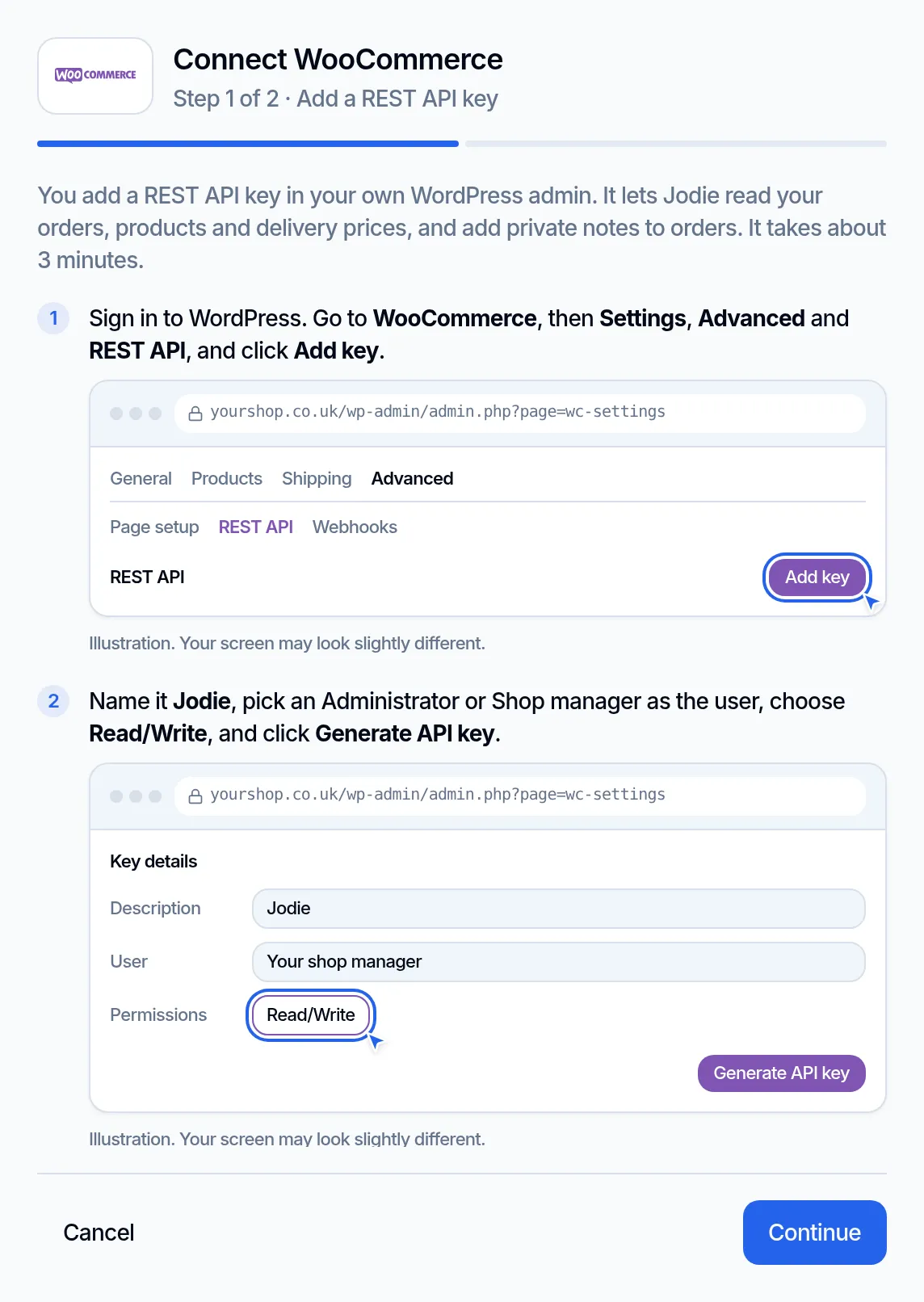
These are real screens from Jodie and WooCommerce. Setup takes about 3 minutes. You need a shop on HTTPS and a WordPress login that manages WooCommerce.
- 01
Add a REST API key in WooCommerce
In WordPress, go to WooCommerce, then Settings, Advanced and REST API, and click Add key. Name it Jodie and pick an Administrator or Shop manager. Choose Read/Write, then click Generate API key.
- 02
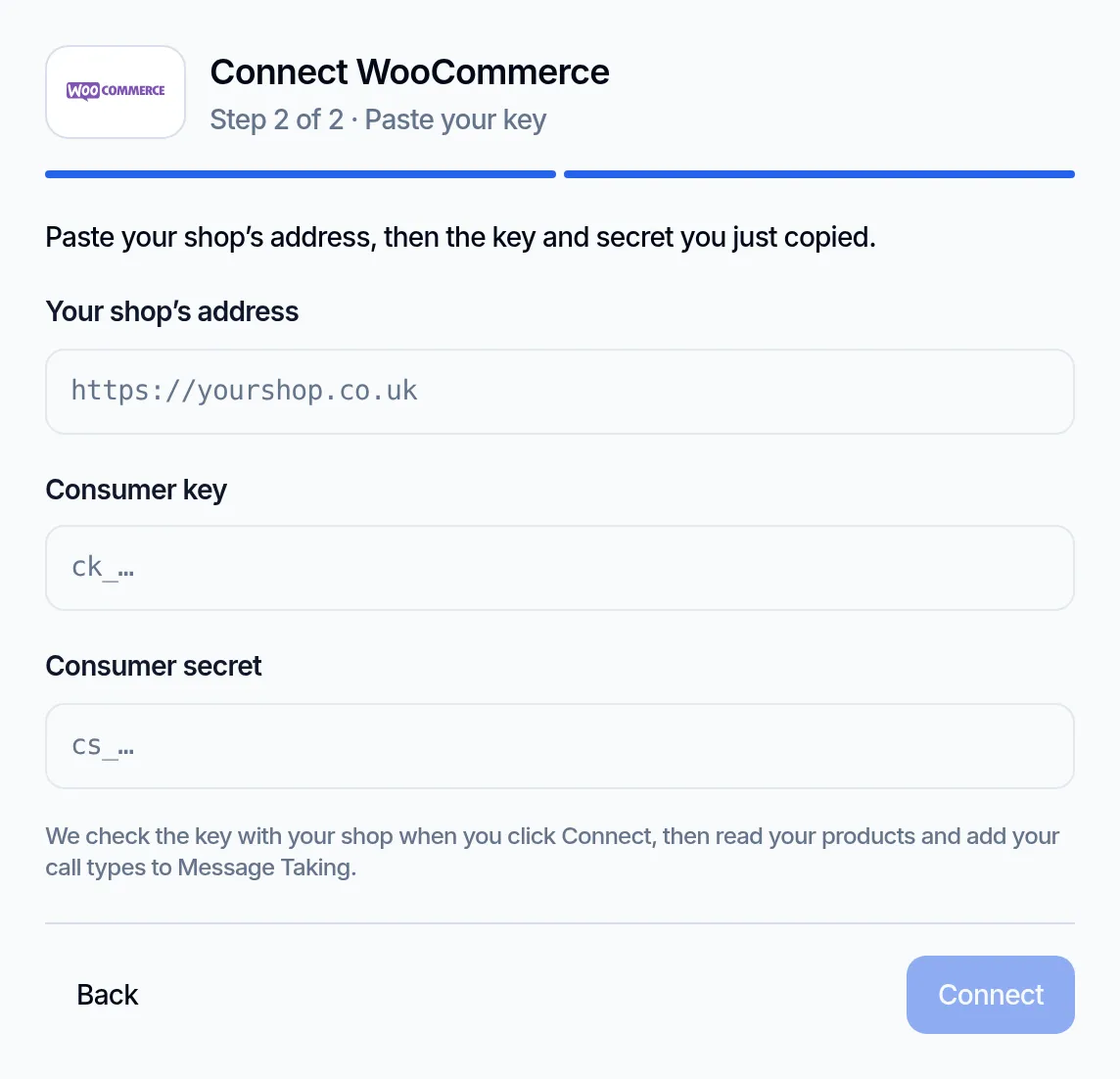
Paste the key, secret and your shop's address
Paste your shop address, then the consumer key and secret, and click Connect. Jodie checks the key with your shop. Then she reads your products and adds your call types.
- 03
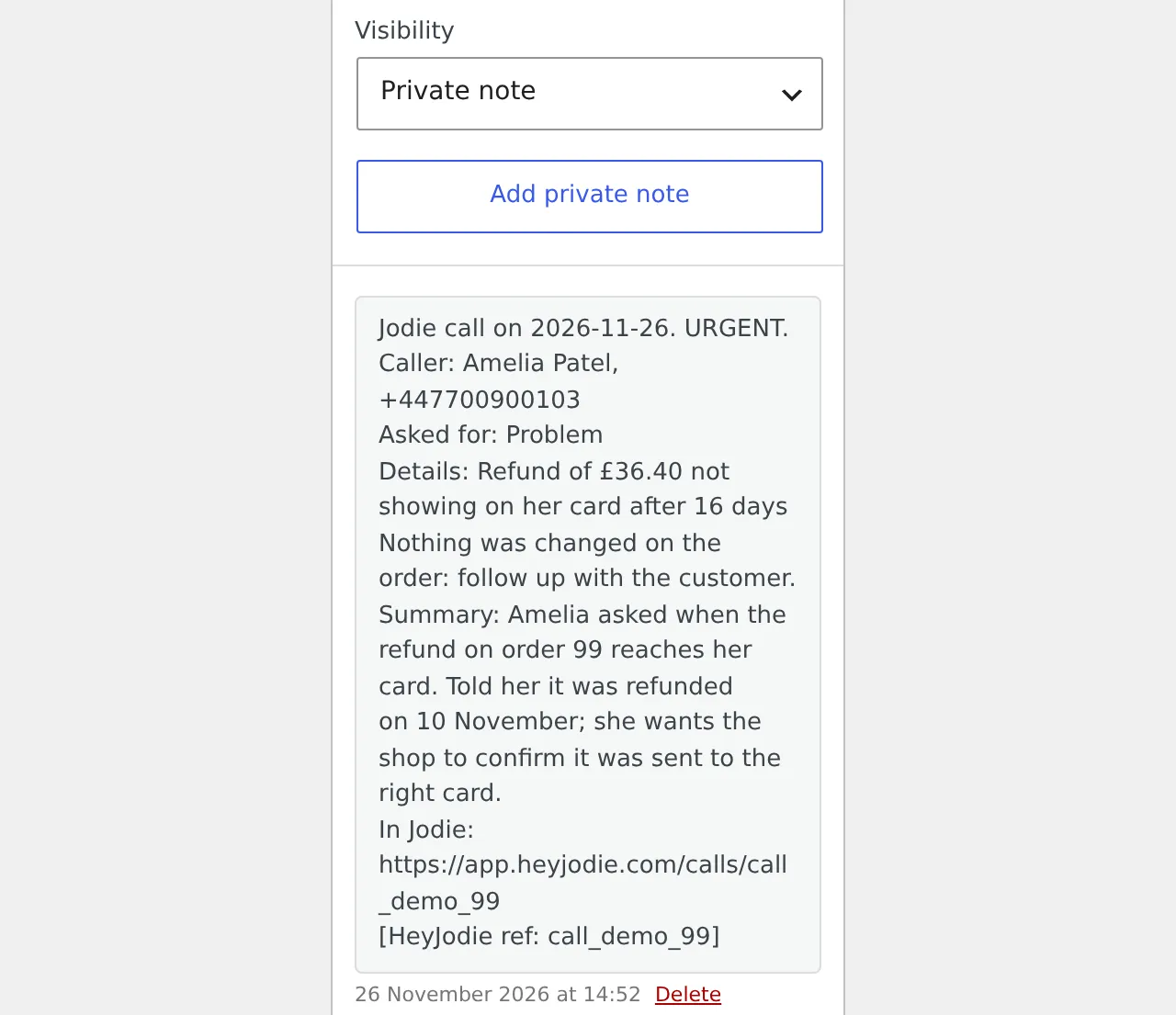
See her notes on your orders
After a call, the order shows a private note from Jodie. It says who called, what they asked for, how urgent it is and what was said. Nothing on the order is changed.
What data is sent and stored?
Plain answers for whoever looks after data protection. Everything goes over an encrypted link to your own shop.
Sent to your WooCommerce
- To look things up: part of the caller's number, their email, the order postcode, an order number, a product code or what they describe
- A private note on each order the caller asked about. It has the caller's name, number and email, what they asked for, the details, the summary and a link to the call
Kept in Jodie
- Your WooCommerce key and secret, encrypted, and your shop address
- Your product names and codes, and your delivery prices, in Jodie's knowledge. Product prices unless you turn them off, and stock only if you turn it on
- A log of each note sent: which orders and the result
- Your ready-made call types, in Message Taking. They stay, paused, if you disconnect
Never sent or stored
- Addresses, phone numbers, emails and payment details from your orders. Jodie's server never gives them to her, so she cannot read them out
- Whether an order exists for someone else. A failed check and a missing order sound the same
- Changes to orders. Jodie never cancels, changes or refunds an order
- Payments, pay links, baskets or orders taken over the phone
- Emails to your customers. Jodie only writes private notes
- Your WordPress password. Jodie only uses the REST API key
- Copies of your data in the service that links Jodie and WooCommerce. It stores nothing
Why connect WooCommerce?
Callers ask about orders, products and delivery. With your shop to hand, Jodie can answer all three.
- 01
Order questions answered
Callers hear the status, the items and the tracking number at any hour, without waiting for your team.
- 02
Only the right customer
Jodie's server checks the caller before she sees an order. She never says if an order exists for someone else.
- 03
Live stock and prices
She checks your shop during the call, so callers hear what is in stock right now.
- 04
Real delivery costs
She reads your shipping zones and says what delivery costs. She never promises a day.
- 05
You stay in charge
Jodie never cancels, changes or refunds an order. Requests wait for your team as private notes.
- 06
Set up in 3 minutes
Make a REST API key in WooCommerce. Paste it into Jodie with your shop address.
Best AI receptionist for WooCommerce shops
The best AI receptionist for WooCommerce shops answers from your real orders and stock. An ecommerce answering service takes a message. Your team still has to look up the order and call back.
Jodie answers calls for your online store at any hour. She checks the caller, then tells them where their order is. She gives live prices, stock and delivery costs. Anything for your team becomes a private note on the order.
-
Safe with customer details
Jodie only hears about an order once her server has matched the caller to it. She never reads out an address, phone number, email or payment details.
-
Nothing changed by mistake
Jodie never cancels, changes or refunds an order. She takes no payments and no orders.
-
Set up in about 3 minutes
Make a REST API key in WooCommerce. Then paste it into Jodie with your shop address.
Where is my order? WISMO calls for WooCommerce shops
WISMO is short for "where is my order?". It is the question a customer asks while they wait for a delivery.
Jodie reads the WooCommerce order status and says it in plain words, such as "paid and being prepared". She adds when the order was placed, paid and completed, and how it is being sent.
-
Tracking numbers
If you use the WooCommerce Shipment Tracking or Advanced Shipment Tracking plugin, Jodie gives the tracking number and carrier.
-
Messages you already sent
She can repeat what your shop already told the customer, such as a note that the order is on its way. Your private notes stay private.
-
No promised days
WooCommerce does not hold delivery times. So Jodie never promises a delivery day.
WooCommerce AI chatbot or AI receptionist: what is the difference?
A WooCommerce AI chatbot answers in a chat box on your website. It only helps people who type. A customer who calls still needs someone to pick up.
Jodie is an AI receptionist. She answers the phone on the number you already have. She also answers WhatsApp, email and the chat on your website, with the same shop details. So your customer service gives the same answers however people get in touch.
Jodie is not part of WooCommerce. She connects with a REST API key that you make in your own shop.
WooCommerce integration: how Jodie uses the REST API
Jodie connects to your shop with a WooCommerce REST API key. There is no plugin to install and no developer needed.
Make the key under WooCommerce, then Settings, Advanced and REST API. Pick an Administrator or Shop manager user, and set the permission to Read/Write. Jodie only uses write access to add private order notes.
-
Your shop must use HTTPS
Jodie only connects to a shop address that starts with https.
-
What Jodie reads
She reads orders, products and shipping zones, and only what a call needs. The only thing she adds is a private note.
WooCommerce questions
Is there an AI receptionist that works with WooCommerce?
Yes. Jodie is an AI receptionist that answers questions about your WooCommerce shop. She tells callers where their order is, and gives live prices, stock and delivery costs. After the call, she adds a private note to the order.
Is Jodie part of WooCommerce?
No. Jodie is a separate AI receptionist. She connects to your shop with a REST API key you make in WooCommerce. There is nothing to install in WordPress.
How does Jodie know the order is the caller's?
Her server checks before she sees it. The name they give must be on the order. So must the number they call from, the email they wrote from, or the full postcode the order went to. She cannot skip this check.
Will Jodie read out a customer's address or card details?
No. Her server never gives her an address, phone number, email or payment details. If the check fails, she does not say whether the order exists.
Can Jodie cancel or refund an order?
No, on purpose. Jodie never cancels, changes or refunds an order, and takes no payments. She adds a private note to the order, and your team acts on it.
Can customers order over the phone?
No. Jodie does not build baskets, send pay links or take orders. She tells callers about products, prices and stock, and takes a message for your team.
Does Jodie know what is in stock?
Yes. She checks live stock and prices during the call, for each size or option. She can say "size M has 3 left, size L is out of stock".
Can Jodie say when an order will arrive?
She gives the status, the delivery method and the tracking number when your shop has one. She never promises a delivery day, because WooCommerce does not hold delivery times.
Does the customer see Jodie's order note?
No. The note is private and is never emailed to the customer. It tells your team what the caller wanted and how urgent it is. If the call is sent again, the note is not written twice.
What if my shop has thousands of products?
Jodie still works. A shop with more than 500 products gives her its categories only. She then searches your shop live for what the caller describes, even plurals like "hoodies".
How do I connect WooCommerce?
In WordPress, go to WooCommerce, Settings, Advanced, REST API and click Add key. Pick an Administrator or Shop manager, choose Read/Write and copy the key and secret. Paste them into Jodie with your shop address.
Which Jodie plan do I need?
Professional or above. It also comes with your free trial.