


Jodie is an AI receptionist that knows every car, van and bike you advertise on AutoTrader. She reads your stock every night. Callers get real answers on price, mileage and what is still for sale, at any hour. There is no login to share. You paste your dealer page address and you are done in about a minute.
- Every car, van and bike in your stock
- Read again every night, about 3am
- Nothing to sign in to, no password
How does Jodie work with AutoTrader?
Your stock is already public on AutoTrader. Jodie reads it from your own dealer pages and keeps it in her knowledge. So every caller hears what you have today.
- 01
A buyer calls
They saw a car on AutoTrader at 9pm. They want to know if it is still for sale and what the mileage is.
- 02
Jodie knows the car
She finds it by make, model or price. She answers from the advert: price, mileage, year, fuel and more.
- 03
Read every night
Jodie reads your stock again every night at about 3am, your time. New cars appear and sold ones drop out.
- 04
Your stock, your sites
Jodie only reads the dealer sites you add. Nothing is written to AutoTrader. There is no login to share.
What does Jodie know from AutoTrader?
Every car, van and bike in your AutoTrader stock, with the advert details buyers ask about. It all sits in one place in her knowledge.
Vehicle
What the car, van or bike is.
- Make
- Model
- Trim
- Year
- Body type
- Paint
Advert details
The facts buyers ask about first.
- Price
- Mileage
- Fuel
- Transmission
- Owners
- ULEZ compliance
Your stock
From every dealer site you add, up to 10.
- Cars
- Vans
- Bikes
In Jodie's knowledge
One document on your Training page.
- Badge: Synced from AutoTrader
- A lock, so it cannot be edited there
On the AutoTrader page in Jodie
Where you manage it and see how it is doing.
- How many listings
- Last update
- Next update
- Sites it read from
- Log of recent updates
Which calls can Jodie answer from AutoTrader?
Most stock calls ask the same few things. With your adverts to hand, Jodie answers them herself. Then she takes the caller details for your team.
Is it still for sale? Buyer
A buyer calls about a car they saw on AutoTrader last night.
Jodie asks for
- Which vehicle
- Name, phone and email
- Whether they have a part exchange
- When they can come in
In AutoTrader
Jodie checks your stock from her last read. If the car is there, she says so and takes their details for a test drive.
How many miles? Buyer
A caller wants the mileage, the year and how many owners it has had.
Jodie asks for
- Which vehicle
- What they want to know
- Name and number
In AutoTrader
Jodie reads out the mileage, year and number of owners from the advert. Then she offers to book a viewing.
Is it ULEZ compliant? Buyer
A buyer who drives into London asks if the car meets ULEZ rules.
Jodie asks for
- Which vehicle
- Name and number
In AutoTrader
Jodie answers from the ULEZ detail on the advert. The buyer knows before they make the trip.
Automatic or manual? Buyer
A caller only wants an automatic diesel estate.
Jodie asks for
- What they are after
- Their budget
- Name and number
In AutoTrader
Jodie checks the transmission, fuel and body type of each car in stock. She tells the caller which ones fit.
Do you have any vans? Trade buyer
A builder needs a van this week and rings to see what you have.
Jodie asks for
- What they need
- Their budget
- Name, phone and email
In AutoTrader
Jodie lists the vans in your stock with their price and mileage. She passes the caller on to your team.
Anything else like it? Buyer
The car they rang about has gone. Do you have anything similar?
Jodie asks for
- Make or type
- Budget
- Name and number
In AutoTrader
Jodie suggests similar cars you have in stock today. The caller leaves as a warm lead, not a lost one.
How do I set it up?
These are real screens from Jodie. Setup takes about a minute. You need the address of your dealer page on AutoTrader, and nothing else.
- 01
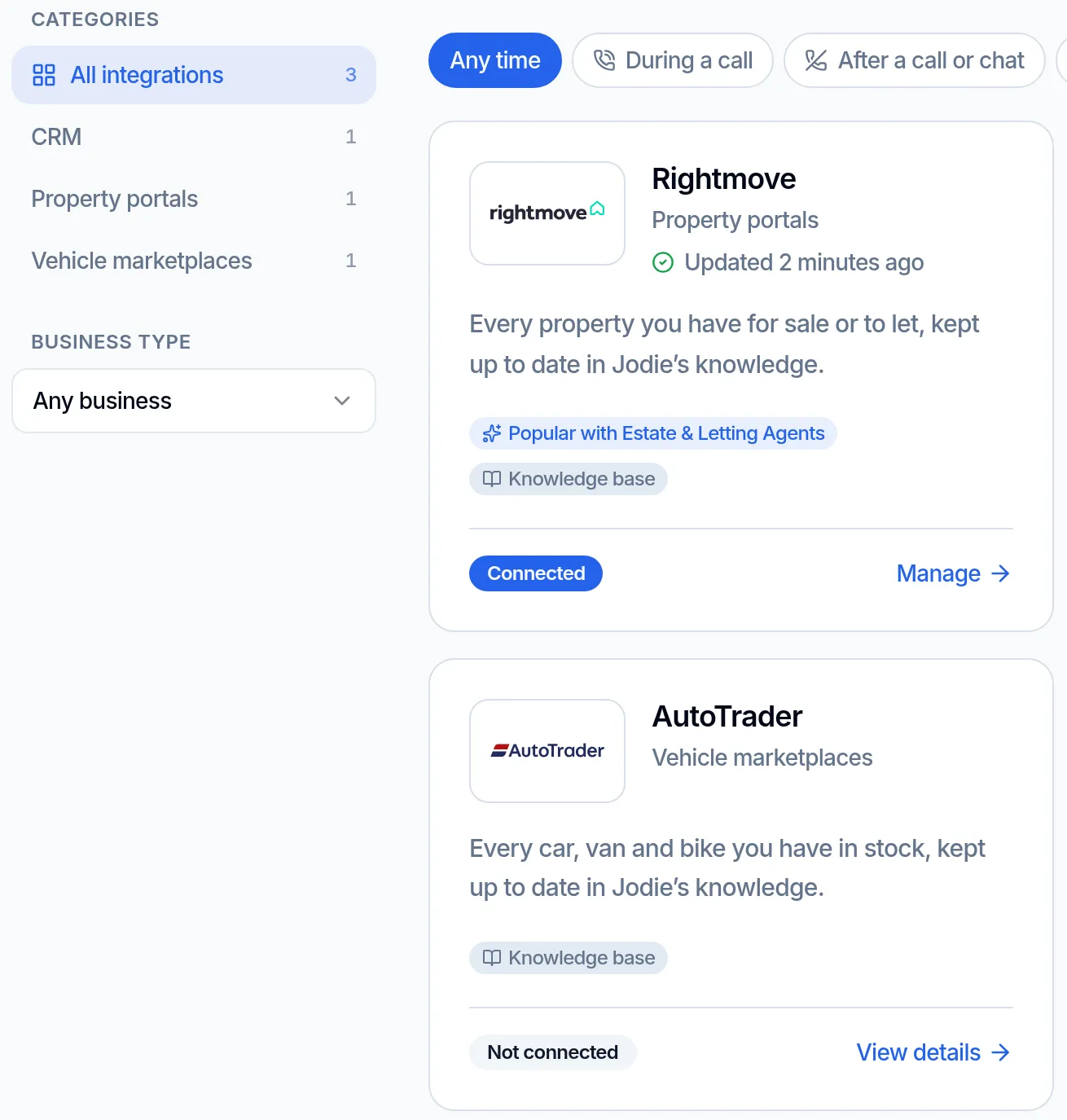
Find AutoTrader in Integrations
Open Integrations in Jodie. AutoTrader sits under Vehicle marketplaces, with a line on what it does.
- 02
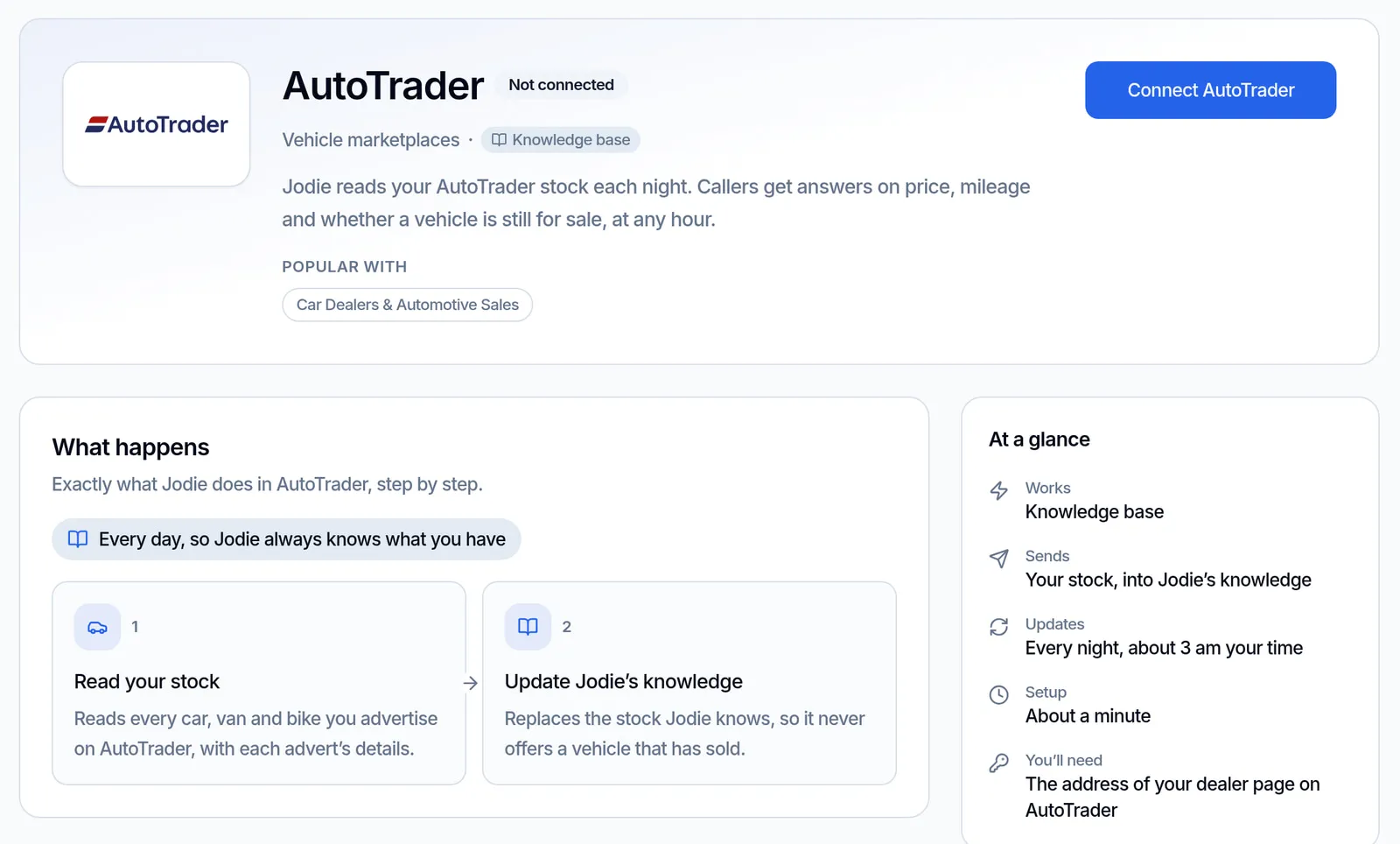
See what it does
The AutoTrader page shows what happens, how often it updates and what you need. Click Connect AutoTrader to start.
- 03
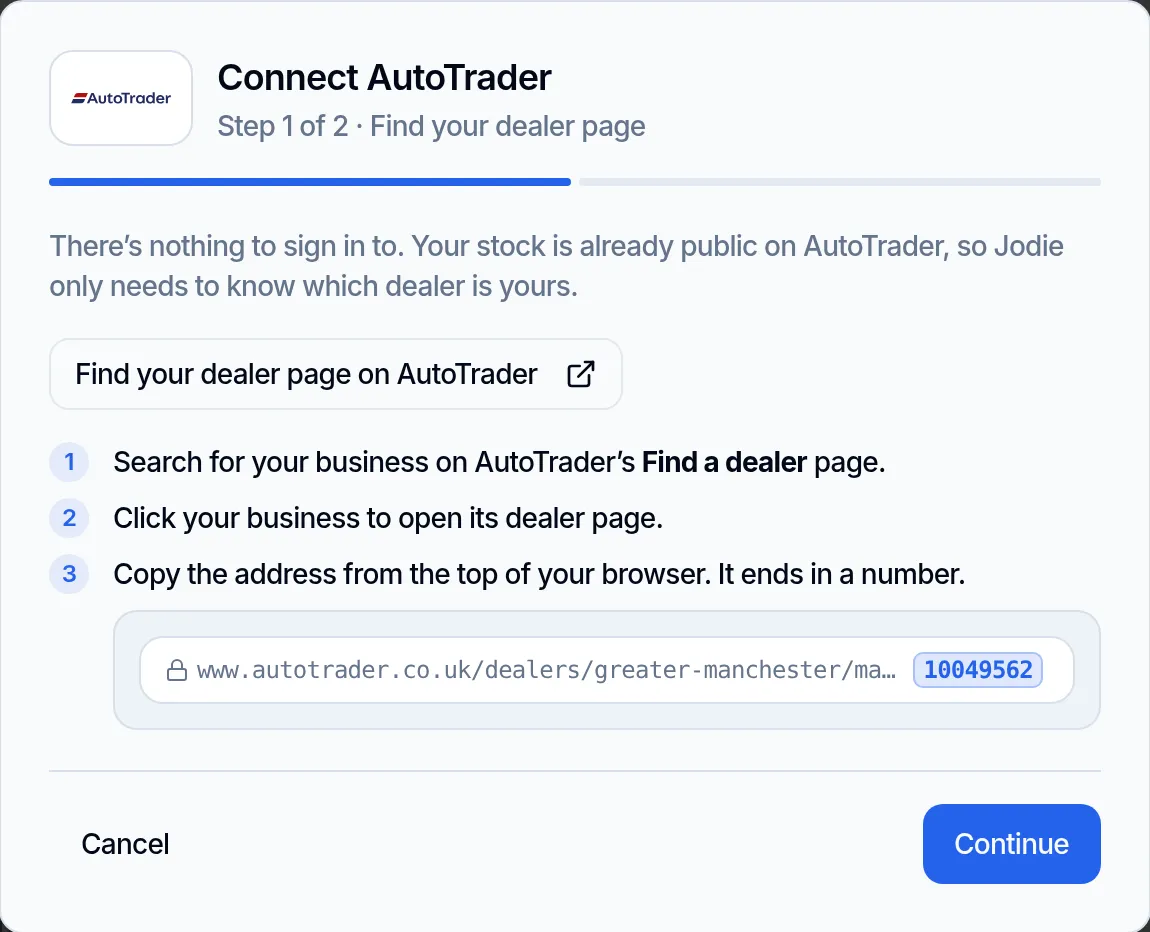
Find your dealer page
Click "Find your dealer page on AutoTrader". Search for your business and open its dealer page. Copy the address. It ends in a number.
- 04
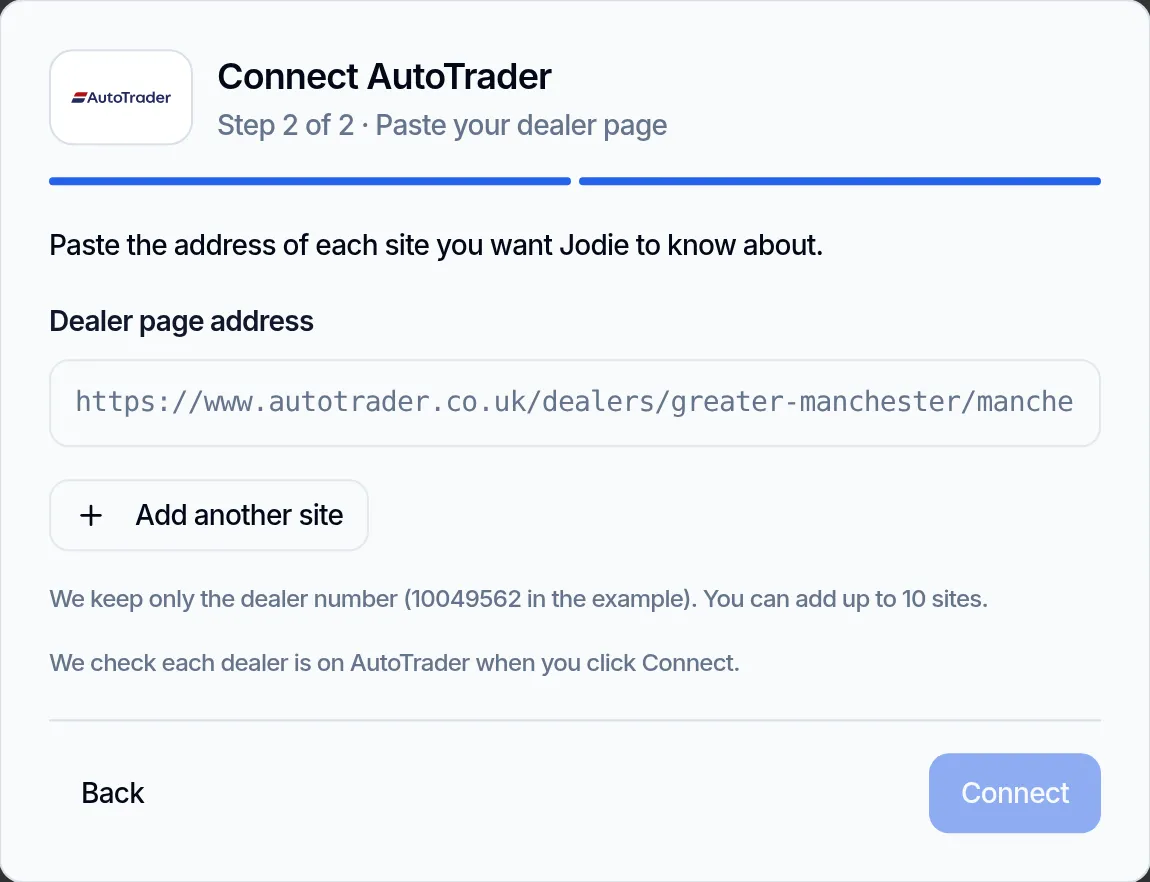
Paste the address
Paste the address of each site, up to 10. A stock page address or the dealer number works too. Jodie checks each dealer before saving.
What data is used and stored?
Jodie only reads stock you have already made public on AutoTrader. She only reads the dealer sites you add.
Read from AutoTrader
- The vehicles in stock on the dealer sites you add
- The details on each advert, as shown above
- Read when you connect, every night at about 3am, and when you click Refresh now
Kept in Jodie
- Your dealer numbers, the number at the end of each dealer page address
- Your stock, as one document in her knowledge
- Adverts that have not changed are not written again
- All of it is forgotten as soon as you disconnect
Never stored or touched
- A login, password or API key. There is none to give
- Anything written to AutoTrader
- Leads or messages inside AutoTrader
- Other dealers' stock
Why connect AutoTrader?
Buyers ring about cars when your showroom is shut. Jodie can answer them properly.
- 01
Real answers at 9pm
Buyers browse AutoTrader in the evening. Jodie tells them the price and mileage, then takes their details.
- 02
Today's stock
Read every night, so Jodie does not offer a car that left your stock last week. Click Refresh now after a busy day.
- 03
Nothing to type up
No stock list to keep in Jodie by hand. Advertise it on AutoTrader and she knows it after the next read.
- 04
Warmer leads
A caller told "yes, it is here, and it has done 24,000 miles" books a test drive. One told "we will call back" rings the next dealer.
- 05
Nothing to sign in to
No login, password or API key. Jodie reads only what is already public, and writes nothing to AutoTrader.
- 06
Set up in a minute
Paste your dealer page address and click Connect. That is all.
AutoTrader questions
Is there an AI receptionist that works with AutoTrader?
Yes. Jodie is an AI receptionist that knows every car, van and bike you advertise on AutoTrader. She reads your stock every night. Callers get real answers on price, mileage and what is still for sale, at any hour.
Is Jodie made by AutoTrader?
No. Jodie is not part of AutoTrader, and AutoTrader does not endorse her. She reads the stock that is already public on your own dealer pages.
Do I need an AutoTrader login or API key?
No. There is nothing to sign in to. Your stock is already public, so Jodie only needs the address of your dealer page. She never asks for a login, password or API key.
How do I find my dealer page address?
In setup, click "Find your dealer page on AutoTrader". Search for your business, open its dealer page and copy the address. It ends in a number. A stock page address or the dealer number on its own also works.
Can I add more than one site?
Yes, up to 10 sites. Paste one dealer page address for each. Jodie checks that each dealer is on AutoTrader before she saves it.
Which vehicles does Jodie know about?
Every car, van and bike in your AutoTrader stock. For each one she knows the make, model, trim, year, mileage, price, fuel, transmission, body type, paint, owners and ULEZ compliance.
How up to date is Jodie?
She reads your stock as soon as you connect. Then she reads it every night at about 3am, your time. You can also click Refresh now at any time.
Where does my stock show up in Jodie?
On your Training page, as one document marked "Synced from AutoTrader" with a lock. You cannot edit or delete it there. You manage it from the AutoTrader page in Jodie.
What if a read fails?
Jodie keeps the stock she already knew, so callers still get answers. The failure shows on the AutoTrader page in Jodie, next to a log of recent updates.
Does Jodie change anything on AutoTrader?
No. Nothing is ever written to AutoTrader. Jodie only reads your adverts so she can answer callers.
Which Jodie plan do I need?
Professional or above. It is not on the Basic plan.
How do I disconnect?
Click Disconnect on the AutoTrader page in Jodie. She forgets your stock straight away. Nothing changes on AutoTrader.