


Jodie is an AI receptionist that knows every listing on your Rightmove branches. She reads every sale and letting each night. Callers get real answers on price, status and bedrooms at any hour. There is no login to share. You paste your branch page address and you are done in about a minute.
- Every sale and letting on your branches
- Read again every night, about 3am
- Nothing to sign in to, no password
How does Jodie work with Rightmove?
Your listings are already public on Rightmove. Jodie reads them from your own branch pages and keeps them in her knowledge. So every caller hears what you have today.
- 01
A buyer or tenant calls
They saw a property on Rightmove at 8pm. They want to know if it is still available.
- 02
Jodie knows the listing
She finds it by postcode, price or type. She answers from the listing: status, price, bedrooms and tenure.
- 03
Read every night
Jodie reads your branches again every night at about 3am, your time. New listings appear and old ones drop out.
- 04
Your listings, your branches
Jodie only reads the branches you add. Nothing is written to Rightmove. There is no login to share.
What does Jodie know from Rightmove?
Every sale and letting on your branches, with the details callers ask about. It all sits in one place in her knowledge.
Listing
The basics callers ask about first.
- Price
- Status
- Property type
- Bedrooms
- Bathrooms
- Postcode
Details
The listing's own words.
- Tenure
- Key features
- Description
Your branches
From every branch you add, up to 20.
- For sale
- To let
- Under offer
- Sold STC
- Let agreed
In Jodie's knowledge
One document on your Training page.
- Badge: Synced from Rightmove
- A lock, so it cannot be edited there
On the Rightmove page in Jodie
Where you manage it and see how it is doing.
- How many listings
- Last update
- Next update
- Branches it read from
- Log of recent updates
Which calls can Jodie answer from Rightmove?
Most portal calls ask the same few questions. With your listings to hand, Jodie answers them herself. Then she takes the details for a viewing.
Is it still available? Buyer
A buyer calls about a house they saw on Rightmove last night.
Jodie asks for
- Which property
- Name, phone and email
- Whether they need to sell first
- When they can view
In Rightmove
Jodie checks the status: for sale, under offer or sold STC. She answers, then takes their details for a viewing.
What is the price? Buyer
A caller wants the asking price and what the house has to offer.
Jodie asks for
- Which property
- Their budget
- Their position
In Rightmove
Jodie gives the price as listed. She adds the bedrooms, bathrooms and key features.
Is the flat still to let? Tenant
A tenant asks if a flat is still free and what the rent is.
Jodie asks for
- Which property
- Move-in date
- Who will live there
- Name and number
In Rightmove
Jodie checks if it is to let or let agreed. She gives the rent as listed, then takes the viewing request.
Is it freehold? Buyer
A buyer asks about the tenure before booking a viewing.
Jodie asks for
- Which property
- What they need to know
In Rightmove
Jodie answers from the tenure and description on the listing. Your team picks up anything it does not cover.
Anything else like it? Buyer or tenant
The house they rang about has gone. Do you have anything similar?
Jodie asks for
- Area
- Bedrooms
- Budget
- Name and number
In Rightmove
Jodie suggests similar listings you have on Rightmove today. She passes the caller on as a warm lead.
How do I set it up?
These are real screens from Jodie. Setup takes about a minute. You need the address of your branch page on Rightmove, and nothing else.
- 01
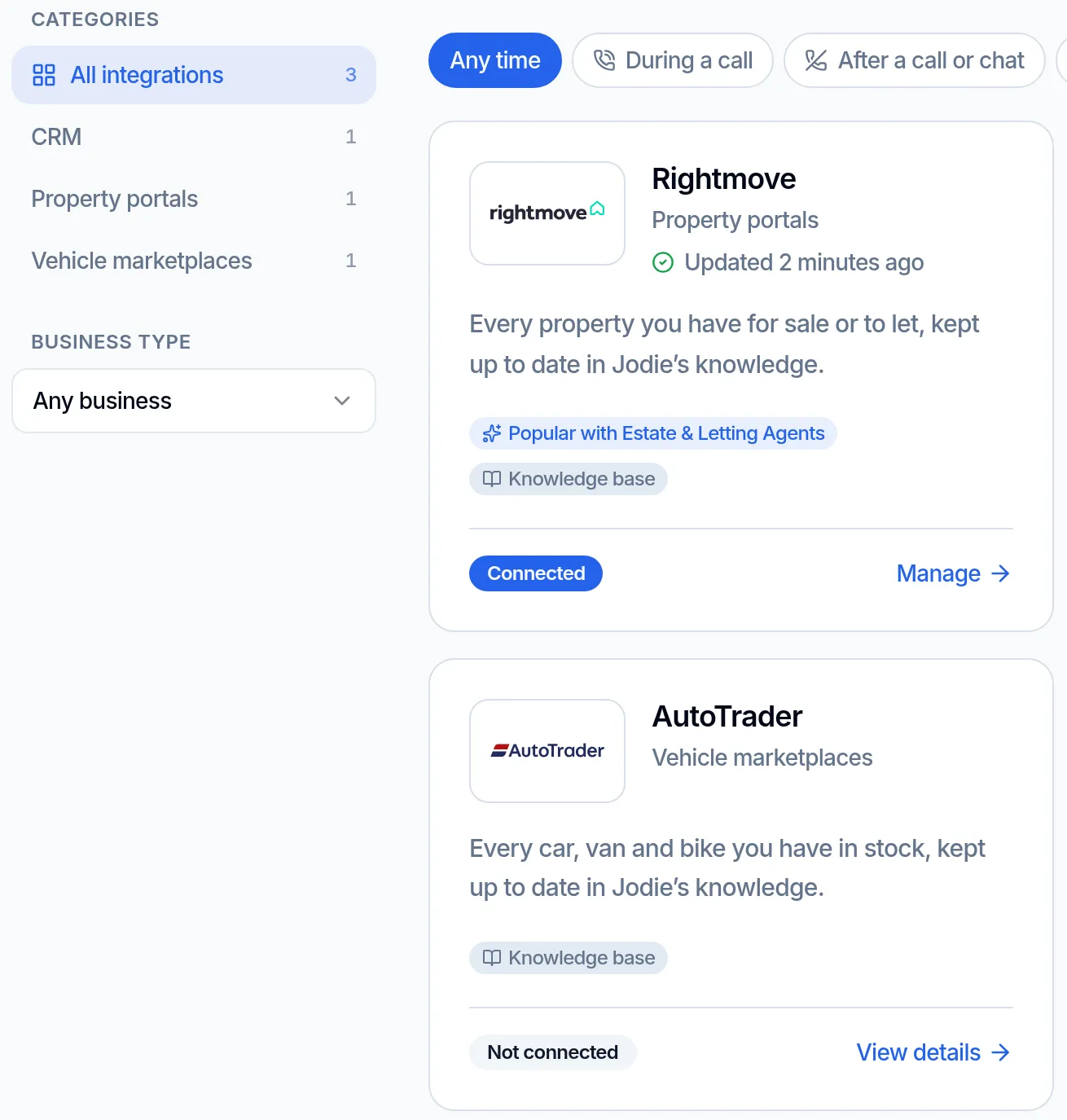
Find Rightmove in Integrations
Open Integrations in Jodie. Rightmove sits under Property portals and shows when it last updated.
- 02
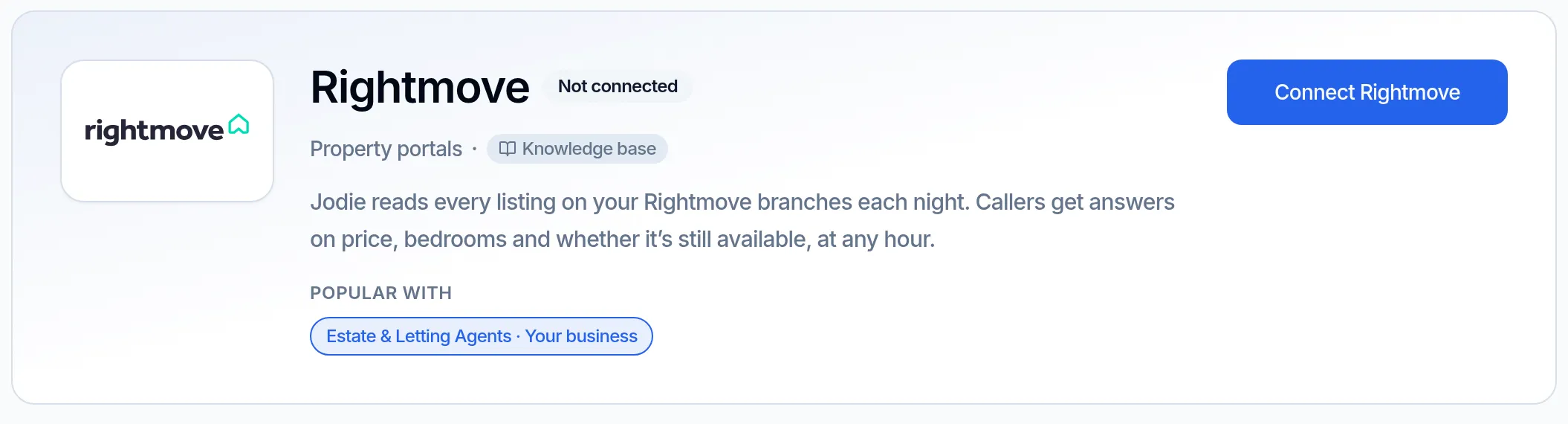
Open the Rightmove page
The Rightmove page says what Jodie reads and how often. Click Connect Rightmove to start.
- 03
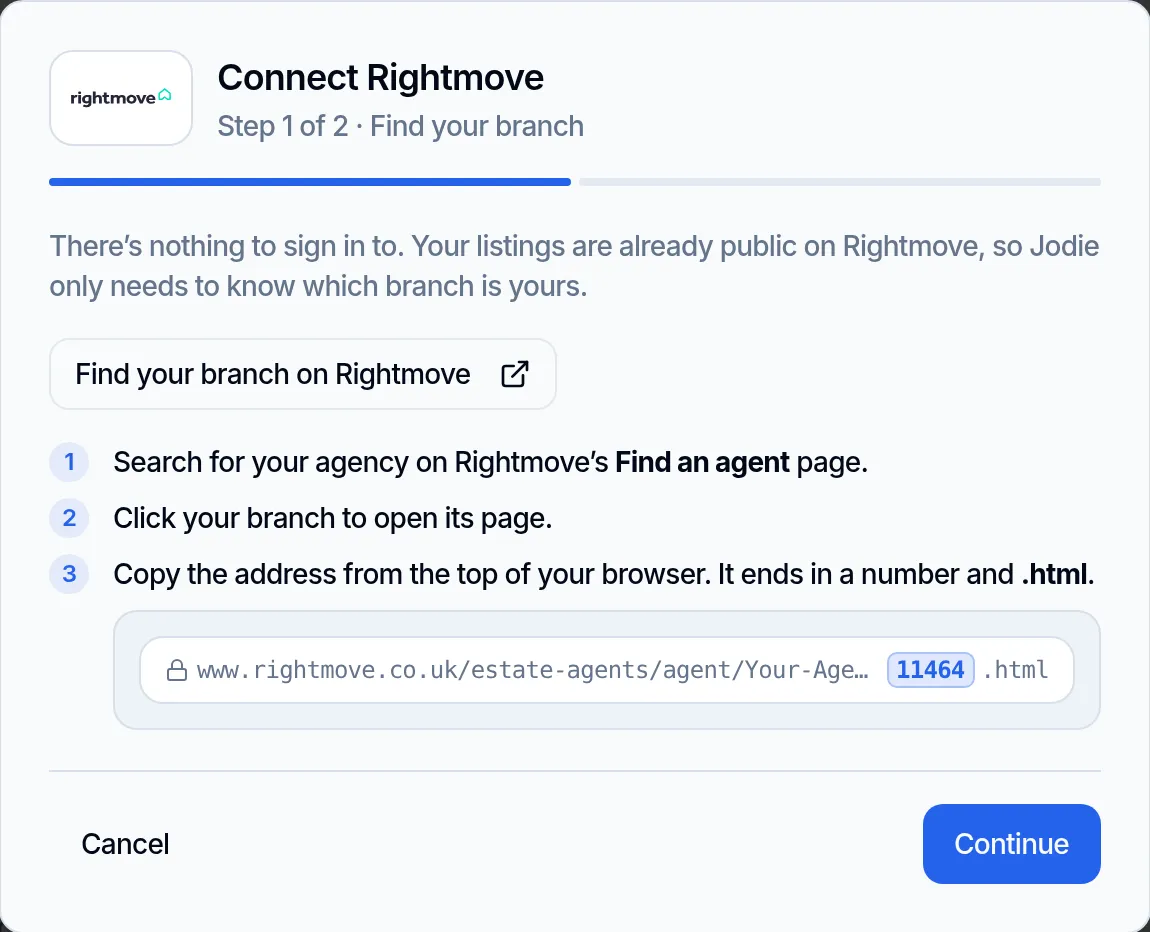
Find your branch
Click "Find your branch on Rightmove". Search for your agency and open your branch page. Copy the address. It ends in a number and .html.
- 04
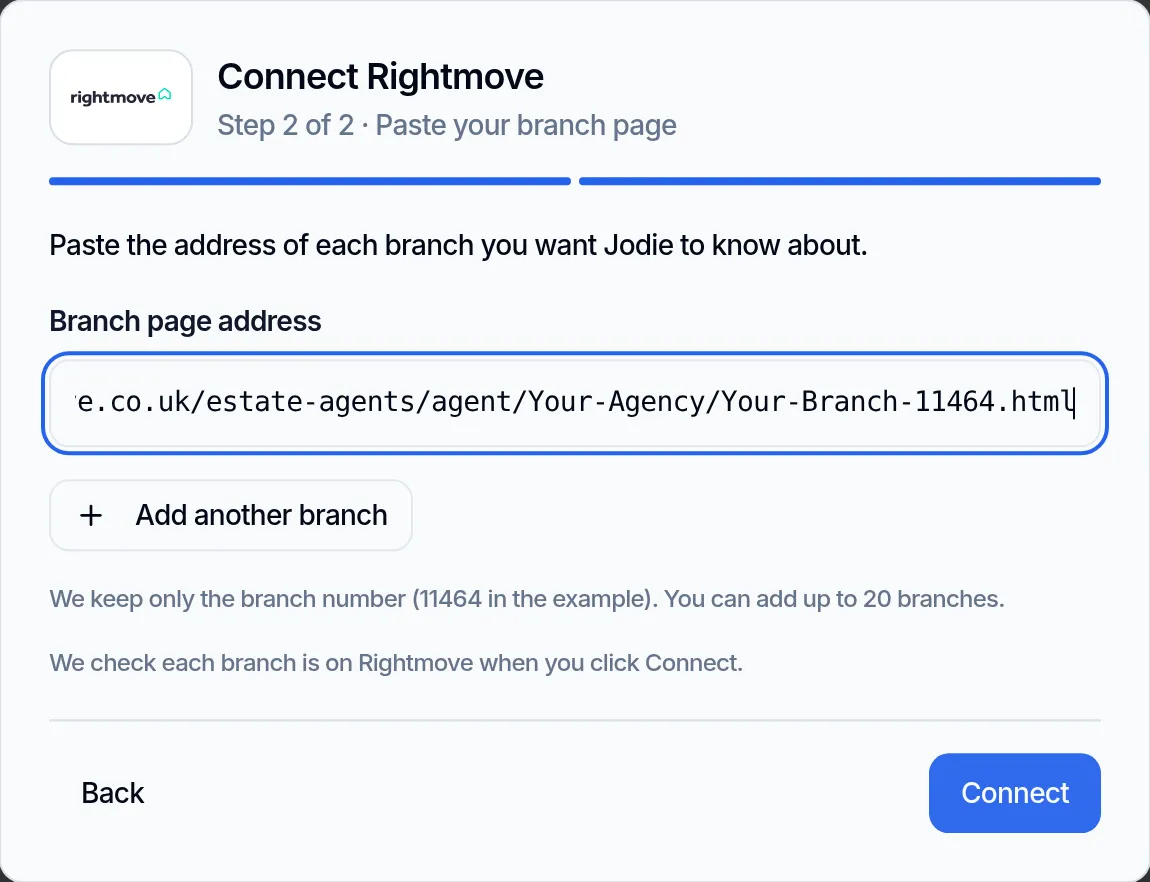
Paste the address
Paste the address of each branch, up to 20. Jodie keeps only the number at the end. She checks each branch before saving.
- 05
See it in her knowledge
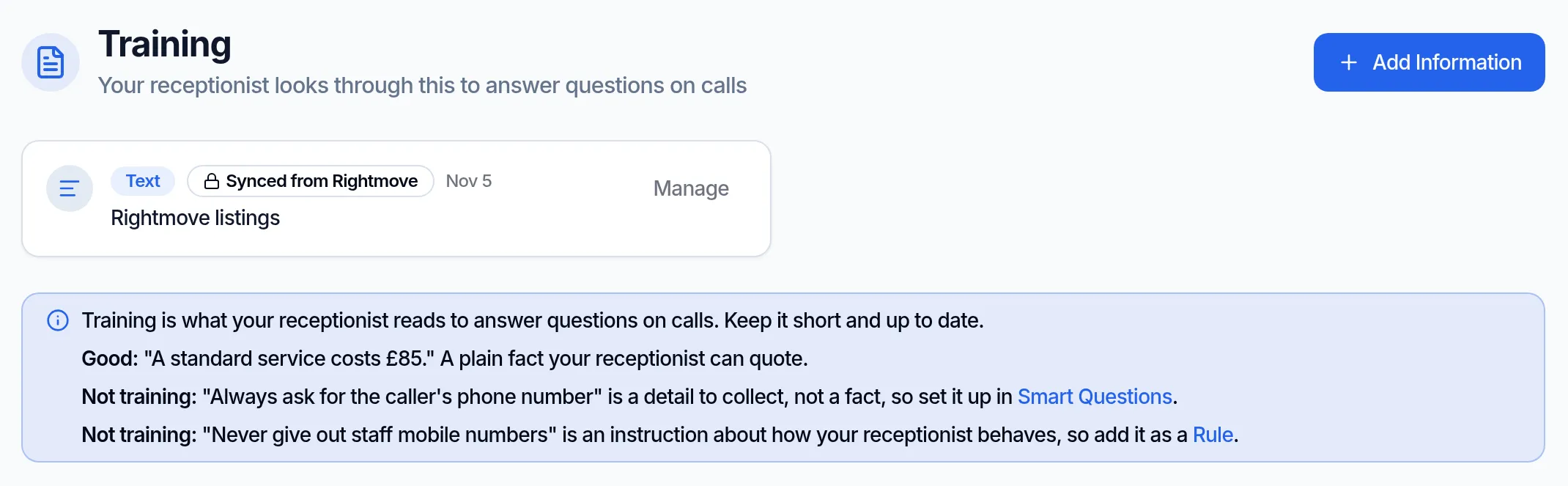
Your listings show on the Training page as one locked document. You manage it from the Rightmove page.
What data is used and stored?
Jodie only reads listings you have already made public on Rightmove. She only reads the branches you add.
Read from Rightmove
- The sales and lettings on the branches you add
- The details on each listing, as shown above
- Read when you connect, every night at about 3am, and when you click Refresh now
Kept in Jodie
- Your branch numbers, the number at the end of each branch page address
- Your listings, as one document in her knowledge
- Listings that have not changed are not written again
- All of it is forgotten as soon as you disconnect
Never stored or touched
- A login, password or API key. There is none to give
- Anything written to Rightmove
- Leads, applicants or messages inside Rightmove
- Other agents' listings
Why connect Rightmove?
Portal calls come in when the office is shut. Jodie can answer them properly.
- 01
Real answers at 9pm
Buyers browse Rightmove in the evening. Jodie tells them if it is available and what it costs. Then she takes the viewing request.
- 02
Today's listings
Read every night, so Jodie knows what is under offer or sold STC. Click Refresh now after a busy day.
- 03
Nothing to type up
No list of listings to keep in Jodie by hand. Put it on Rightmove and she knows it after the next read.
- 04
Warmer leads
Callers who are told yes, it is available, and here is the price, leave their details. Callers told "we will call back" ring the next agent.
- 05
Sales and lettings
Jodie reads both, including let agreed. She handles buyers and tenants alike.
- 06
Set up in a minute
Paste your branch page address and click Connect. There is no login to share.
Rightmove questions
Is there an AI receptionist that works with Rightmove?
Yes. Jodie is an AI receptionist that knows every listing on your Rightmove branches. She reads every sale and letting each night. Callers get real answers on price, status and bedrooms at any hour.
Is this the same as Rightmove's AI search?
No. Ask Rightmove is Rightmove's own AI search, for home hunters on its site. Jodie answers your agency's phone, and uses your listings to answer callers.
Is Jodie made by Rightmove?
No. Jodie is not part of Rightmove, and Rightmove does not endorse her. She reads the listings that are already public on your own branch pages.
Do I need a Rightmove login?
No. There is nothing to sign in to. Your listings are already public, so Jodie only needs the address of your branch page. She never asks for a login, password or API key.
How do I find my branch page address?
In setup, click "Find your branch on Rightmove". Search for your agency and open your branch page. Copy the address. It ends in a number and .html. You can add up to 20 branches, and Jodie checks each one is on Rightmove.
Which properties does Jodie know about?
Every sale and letting on the branches you add, including under offer, sold STC and let agreed. For each one she knows the price, status, type, bedrooms, bathrooms, postcode, tenure, key features and description.
How up to date is Jodie?
She reads your branches as soon as you connect. Then she reads them every night at about 3am, your time. You can also click Refresh now at any time.
Where do my listings show up in Jodie?
On your Training page, as one document marked "Synced from Rightmove" with a lock. You cannot edit or delete it there. You manage it from the Rightmove page in Jodie.
What if a read fails?
Jodie keeps the listings she already knew, so callers still get answers. The failure shows on the Rightmove page in Jodie, next to a log of recent updates.
Does it put leads into Rightmove?
No. Nothing is ever written to Rightmove. Jodie only reads your listings so she can answer callers. To log calls in your CRM, connect Jodie to your CRM as well.
Which Jodie plan do I need?
Professional or above. It is not on the Basic plan.
How do I disconnect?
Click Disconnect on the Rightmove page in Jodie. She forgets your listings straight away. Nothing changes on Rightmove.