

Jodie is an AI receptionist that books work into your Bookar diary while the caller is on the phone. She finds the caller and their car, quotes your own prices and offers free times. Callers can also check, move or cancel a booking. You choose what she may do.
- Books MOTs, services and repairs live
- Your Bookar prices, VAT included
- Check, move or cancel a booking
How does Jodie work with Bookar?
Jodie uses Bookar during the call, not after it. She looks things up while the caller is on the line, then books the job.
- 01
A driver calls
They need an MOT this week. Your team is under a car, so Jodie picks up.
- 02
Jodie finds them
She checks their number in Bookar. A returning customer is greeted by name, with their cars to hand.
- 03
She checks Bookar live
She reads your price for that car and the free times in your diary. Then she offers two or three times.
- 04
Booked in Bookar
Once the caller says yes, the booking is made and confirmed in your diary. They get a booking reference.
What does Jodie read and write in Bookar?
Only what a booking call needs. Jodie reads it during the call, and only books, moves or cancels when the caller says yes.
Customer
Found by phone number. A new caller is added when they book.
- Name
- Phone number
- Cars on their record
- New caller: name, email and phone
- Offers: only if they say yes
Car
Found by registration, from your records or from DVLA.
- Make and model
- Mileage
- MOT due date
- MOT advisories
- Work found on a past visit, with its price
- Recent visits
Services and prices
The services you take online bookings for.
- Service name
- Price for that car, VAT included
- Rough length of the job
Free times
From your diary, up to two weeks ahead.
- Days with free times
- Start times
- Morning drop-off days
- First day you take bookings
Booking
Made, moved or cancelled during the call.
- Reference
- Day and time
- Car
- Work booked
- Stage of the job
- Reason for a cancellation
Which calls can Jodie handle with Bookar?
Most garage calls are bookings, prices and "is it ready?". With Bookar to hand, Jodie deals with them on the call.
MOT for a regular Returning customer
A regular rings to book the MOT on the car they always bring in.
Jodie asks for
- Who they are, from their number
- Which of their cars it is
- The day and time that suits
In Bookar
Jodie quotes your MOT price, offers free times and books it in your diary. She reads the reference back.
Service for a new caller New customer
Someone new wants a full service and has never been to you before.
Jodie asks for
- The registration, read back to check
- First name, email and phone
- Yes or no to offers
- The day and time that suits
In Bookar
Jodie looks the car up and quotes your service price for it. The booking adds them as a customer in Bookar.
Is my car ready? Customer
A customer wants to know if they can pick their car up after work.
Jodie asks for
- Who they are, or their registration
- Which booking
In Bookar
Jodie checks the booking in Bookar and says what stage the job is at, such as in progress or ready to collect.
How much for brakes? Driver
A driver wants a price before they decide to book.
Jodie asks for
- The registration
- The work they want
In Bookar
Jodie quotes the price Bookar gives for that car, VAT included. If a job is priced on inspection, she says you will confirm it.
Move my booking Customer
Something came up, and a customer needs a different day.
Jodie asks for
- Which booking
- A new day and time
In Bookar
Jodie finds the booking, offers new free times and moves it. The work and the car stay the same.
Cancel my booking Customer
A customer has sold the car and does not need the service any more.
Jodie asks for
- Which booking
- A clear yes
- Why they are cancelling
In Bookar
Jodie reads the booking back, cancels it once they say yes and saves the reason in Bookar.
How do I set it up?
These are real screens from Jodie. Setup takes about 2 minutes once you have your keys from Bookar.
- 01
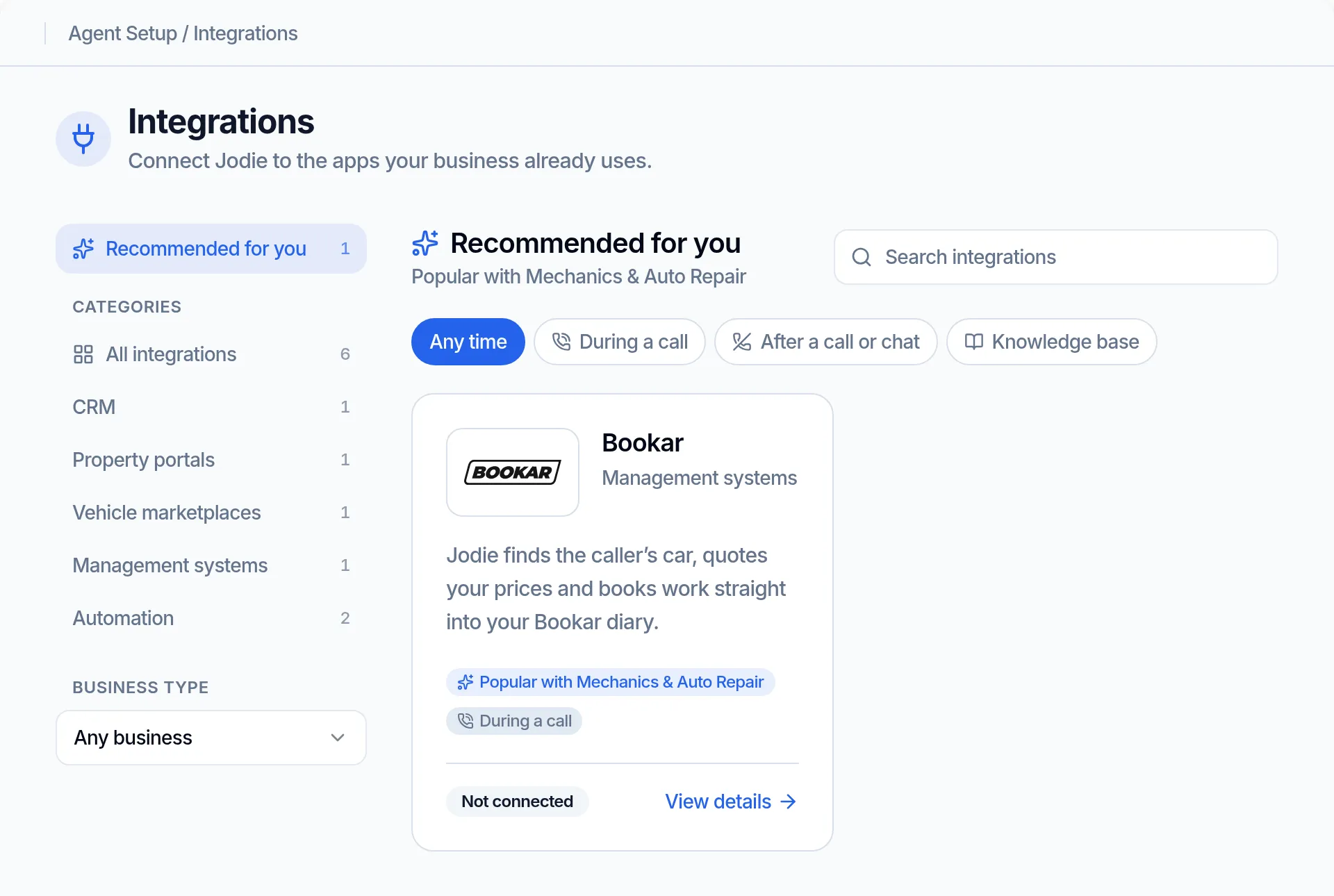
Find Bookar in Integrations
Open Integrations in Jodie. Bookar sits under Management systems, and garages see it under Recommended for you.
- 02
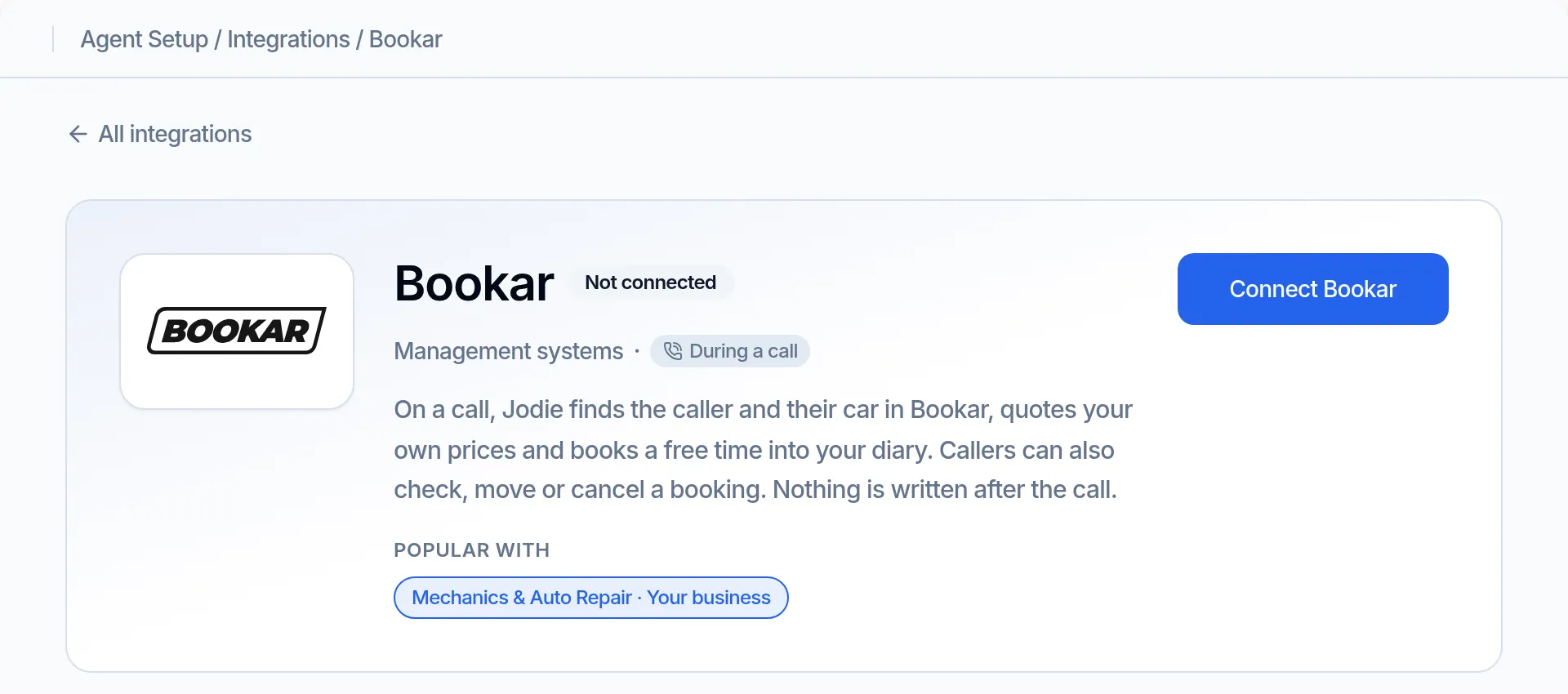
See what it does
The Bookar page shows each thing Jodie can do on a call. Click Connect Bookar to start.
- 03
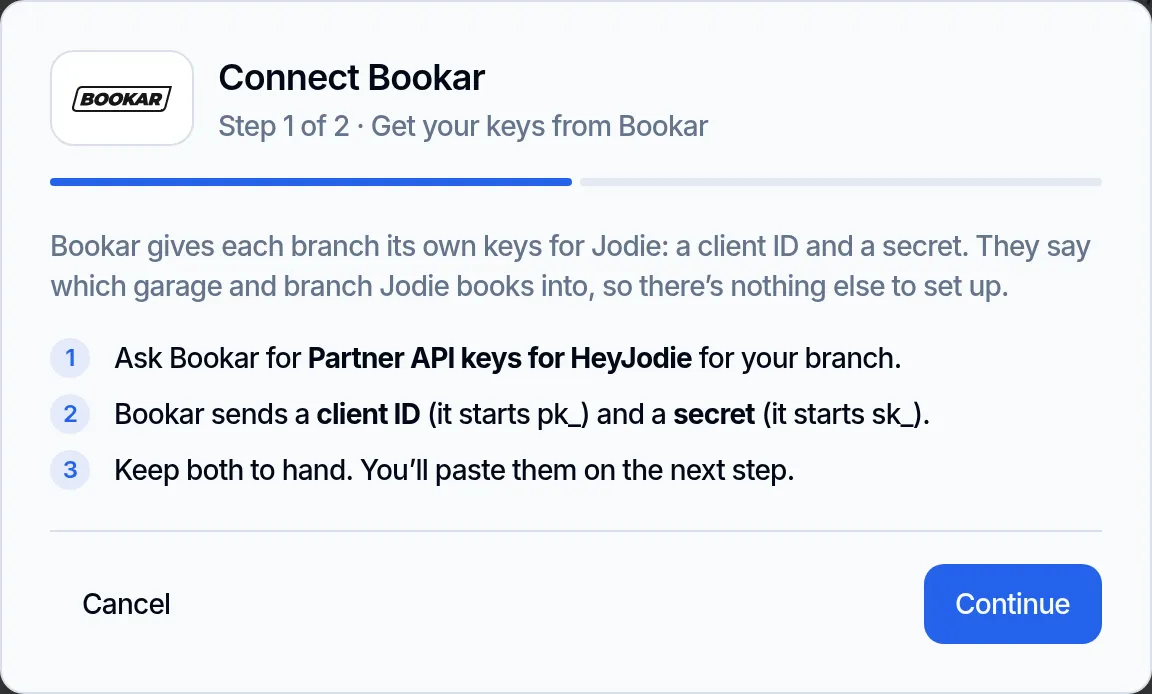
Get your keys from Bookar
Ask Bookar for Partner API keys for your branch. They send a client ID that starts pk_ and a secret that starts sk_.
- 04
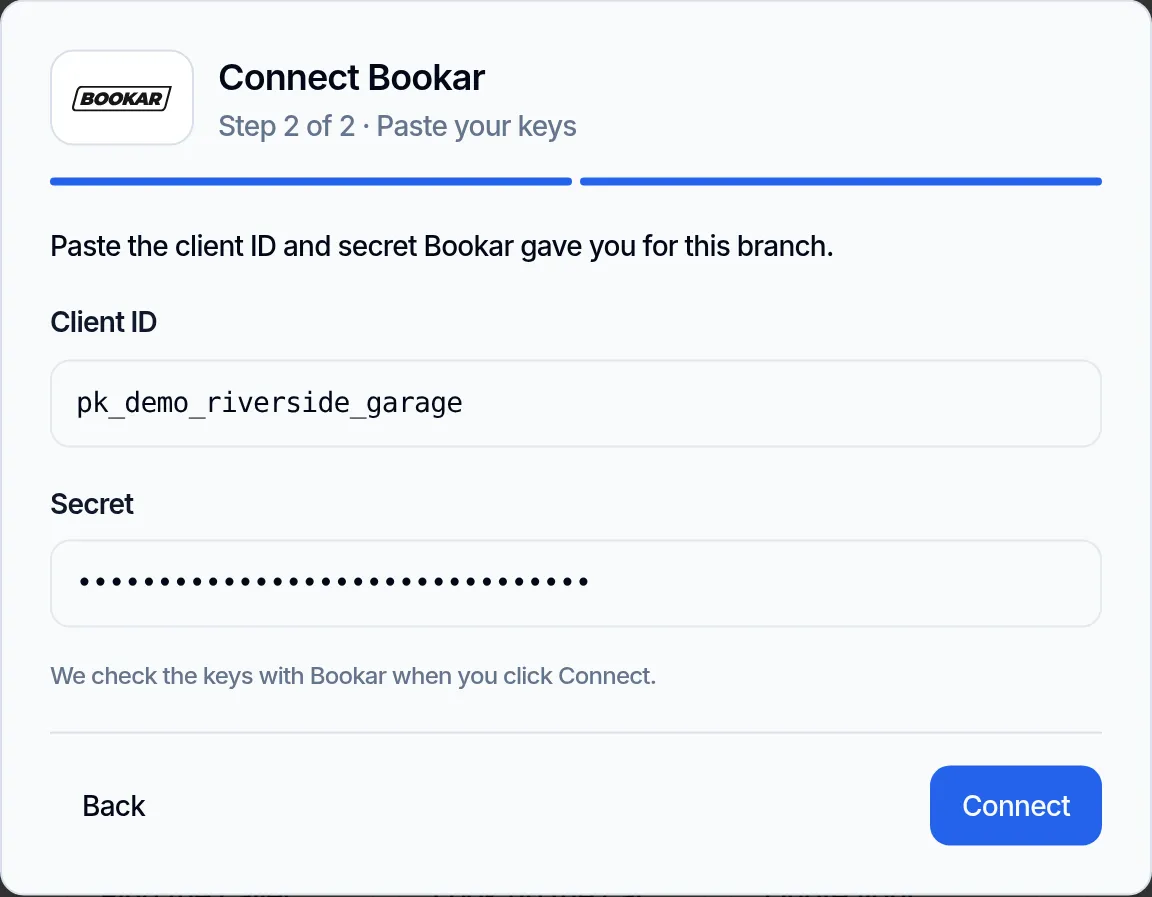
Paste your keys
Paste the client ID and secret, then click Connect. Jodie checks the keys with Bookar before she saves them.
- 05
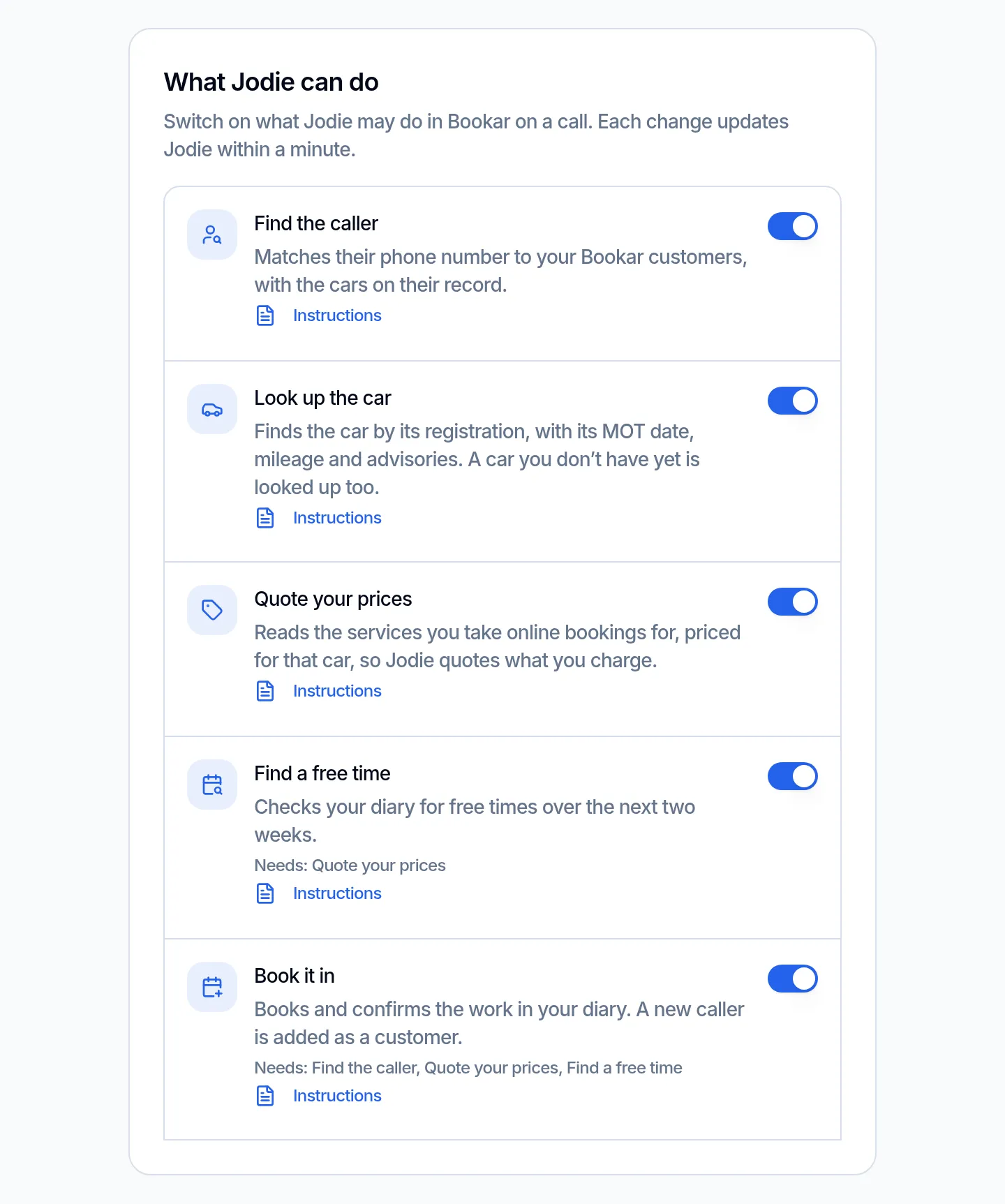
Choose what Jodie can do
Switch each action on or off. All are on to start. Some need another one on, such as booking, which needs the caller found first.
- 06
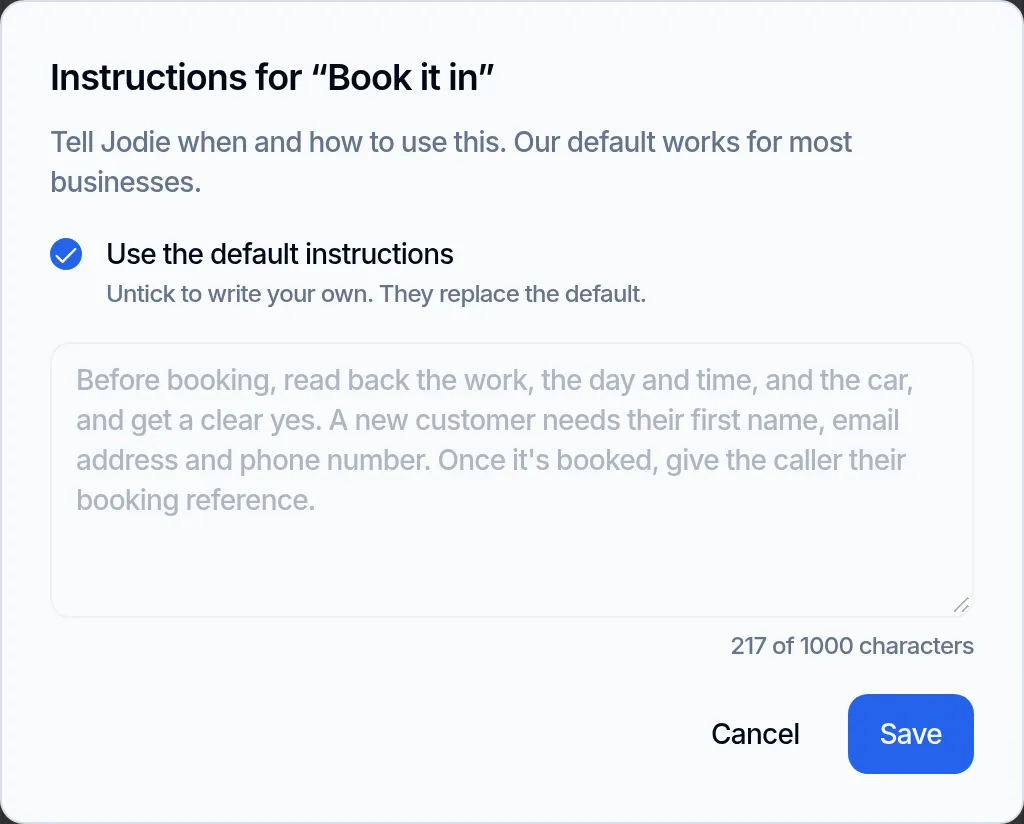
Write your own instructions
Open Instructions on any action to see what Jodie does by default. Untick the box to write your own instead.
What data is sent and stored?
Jodie only sends Bookar what each call needs, while the call is on. Nothing is sent after it.
Sent to Bookar during the call
- The caller's phone number, to find them
- A registration, to look up the car or price the work
- The work, day and time the caller picks
- A new caller's name, email and phone, and yes or no to offers
- The car's mileage, if a new caller knows it
- A booking reference, and the reason for a cancellation
Kept in Jodie
- Your client ID and secret, encrypted and never shown again
- Which actions are on, and your own instructions
- The call's transcript and summary, as with every call
- Your keys, switches and instructions are deleted when you disconnect
Never copied or sent
- Your customer list or diary. Jodie only looks up what each call needs
- The call recording, transcript or summary. Bookar has nowhere to put them
- Invoices, staff or work orders. Bookar does not share them with Jodie
- Payments. Jodie does not take money for a booking
Why connect Bookar?
A garage call is usually a booking. Jodie can now make it, not just take a message.
- 01
Bookings, not messages
The job is in your diary before the caller hangs up. Nobody has to ring them back to book it.
- 02
Your real prices
Jodie quotes the price Bookar gives for that car, VAT included. She never works out a price herself.
- 03
Only free times
She only offers times your diary shows as free. If one is taken mid-call, she offers another.
- 04
Fewer "is it ready?" calls
Jodie tells callers what stage their job is at, so your team can stay on the tools.
- 05
You stay in charge
Switch each action on or off, and give Jodie your own instructions for each one.
- 06
Set up in 2 minutes
Paste the two keys Bookar gives your branch and click Connect.
Bookar questions
Is there an AI receptionist that works with Bookar?
Yes. Jodie is an AI receptionist that books work into your Bookar diary during the call. She finds the caller and their car, quotes your own prices and offers free times. Callers can also check, move or cancel a booking.
Is Jodie the same as Bookar's AI Assistant?
No. Bookar's AI Assistant answers your team's questions inside Bookar. Jodie answers your phone, and uses Bookar to book callers in.
How does Jodie connect to Bookar?
Directly, with no Zapier. Ask Bookar for Partner API keys for your branch: a client ID and a secret. Paste them on the Bookar page in Jodie. She checks them with Bookar before saving.
Which branch does Jodie book into?
The branch your keys belong to. Bookar gives each branch its own keys, so there is nothing else to pick. One Jodie account connects to one branch.
Does Jodie quote my prices?
Yes. She quotes the price Bookar gives for that car, VAT included. She only quotes services you take online bookings for. If a job has no price, such as a diagnosis, she says you will confirm it.
Can Jodie double book my diary?
No. She only offers times Bookar shows as free. If a time is taken while she is on the call, Bookar turns it down and she offers another. Asking twice in one call never makes a second booking.
What happens when a new customer calls?
Jodie takes their first name, email, phone number and registration. Bookar needs an email for a new customer. The booking adds them as a customer, and they only get offers if they say yes.
Can I choose what Jodie does in Bookar?
Yes. Switch each action on or off on the Bookar page in Jodie. Booking needs Find the caller, Quote your prices and Find a free time. You can replace the instructions for any action with your own, up to 1,000 characters.
Does the call summary go into Bookar?
No. Bookar has no place for call notes, so the fault a caller describes stays in the call summary in Jodie. Bookar gets the booking itself.
Does it work on WhatsApp or email?
No. Jodie uses Bookar on phone calls only. On WhatsApp, email and web chat she answers as she does today.
Which Jodie plan do I need?
Professional or above. You can open the Bookar page in Jodie on any plan to see what it does first.
How do I disconnect?
Click Disconnect on the Bookar page in Jodie. Your keys, switches and instructions are deleted at once, and Jodie stops using Bookar on calls. Nothing changes in Bookar.