
Jodie is an AI receptionist that knows every listing on your Zoopla branches. She reads every sale and letting each night. Callers get real answers on price, status and bedrooms at any hour. She uses them on WhatsApp, email and web chat too. There is no login to share. You paste your branch page address and you are done in about a minute.
- Every sale and letting on your branches
- Read again every night, about 3am
- Nothing to sign in to, no password
How does Jodie work with Zoopla?
Your listings are already public on Zoopla. Jodie reads them from your own branch pages and keeps them in her knowledge. So every caller hears what you have today.
- 01
A buyer or tenant calls
They saw a property on Zoopla at 8pm. They want to know if it is still available.
- 02
Jodie knows the listing
She finds it by street, postcode, price or type. She answers from the listing: status, price, bedrooms and tenure.
- 03
Read every night
Jodie reads your branches again every night at about 3am, your time. New listings appear and old ones drop out.
- 04
Your listings, your branches
Jodie only reads the branches you add. Nothing is written to Zoopla. There is no login to share.
What does Jodie know from Zoopla?
Every sale and letting on your branches, with the details callers ask about. It all sits in one place in her knowledge.
Listing
The basics callers ask about first.
- Address and full postcode
- Price
- Price label, such as Guide price
- Status
- Property type
- Bedrooms
- Bathrooms
Details
A few more facts from the listing.
- Tenure
- Up to 3 key features
Lettings
Extra facts for homes to let.
- Available from
- Furnishing
Your branches
From every branch you add, up to 20.
- For sale
- To let
- Under offer
- Sold STC
- Let agreed
In Jodie's knowledge
One document on your Training page.
- Badge: Synced from Zoopla
- A lock, so it cannot be edited there
Which calls can Jodie answer from Zoopla?
Most portal calls ask the same few questions. With your listings to hand, Jodie answers them herself. Then she takes the details for a viewing.
Is it still available? Buyer
A buyer calls about a house they saw on Zoopla last night.
Jodie asks for
- Which property
- Name, phone and email
- Whether they need to sell first
- When they can view
In Zoopla
Jodie checks the status: for sale, under offer or sold STC. She answers, then takes their details for a viewing.
What is the guide price? Buyer
A caller wants the price and what the house has to offer.
Jodie asks for
- Which property
- Their budget
- Their position
In Zoopla
Jodie gives the price as listed, with its label, such as Guide price. She adds the bedrooms, bathrooms and key features.
When can I move in? Tenant
A tenant asks if a flat is still free, when it is ready and if it is furnished.
Jodie asks for
- Which property
- Move-in date
- Who will live there
- Name and number
In Zoopla
Jodie checks if it is to let or let agreed. She gives the rent, the date it is free and the furnishing, then takes the viewing request.
Is it freehold? Buyer
A buyer asks about the tenure before booking a viewing.
Jodie asks for
- Which property
- What they need to know
In Zoopla
Jodie answers from the tenure on the listing. Your team picks up anything the listing does not cover.
Anything else like it? Buyer or tenant
The house they rang about has gone. Do you have anything similar?
Jodie asks for
- Area
- Bedrooms
- Budget
- Name and number
In Zoopla
Jodie suggests similar listings you have on Zoopla today. She passes the caller on as a warm lead.
How do I set it up?
These are real screens from Jodie. Setup takes about a minute. You need the address of your branch page on Zoopla, and nothing else. If you list the same homes on Rightmove, connect only one of the two. Connecting both puts every listing in her knowledge twice.
- 01
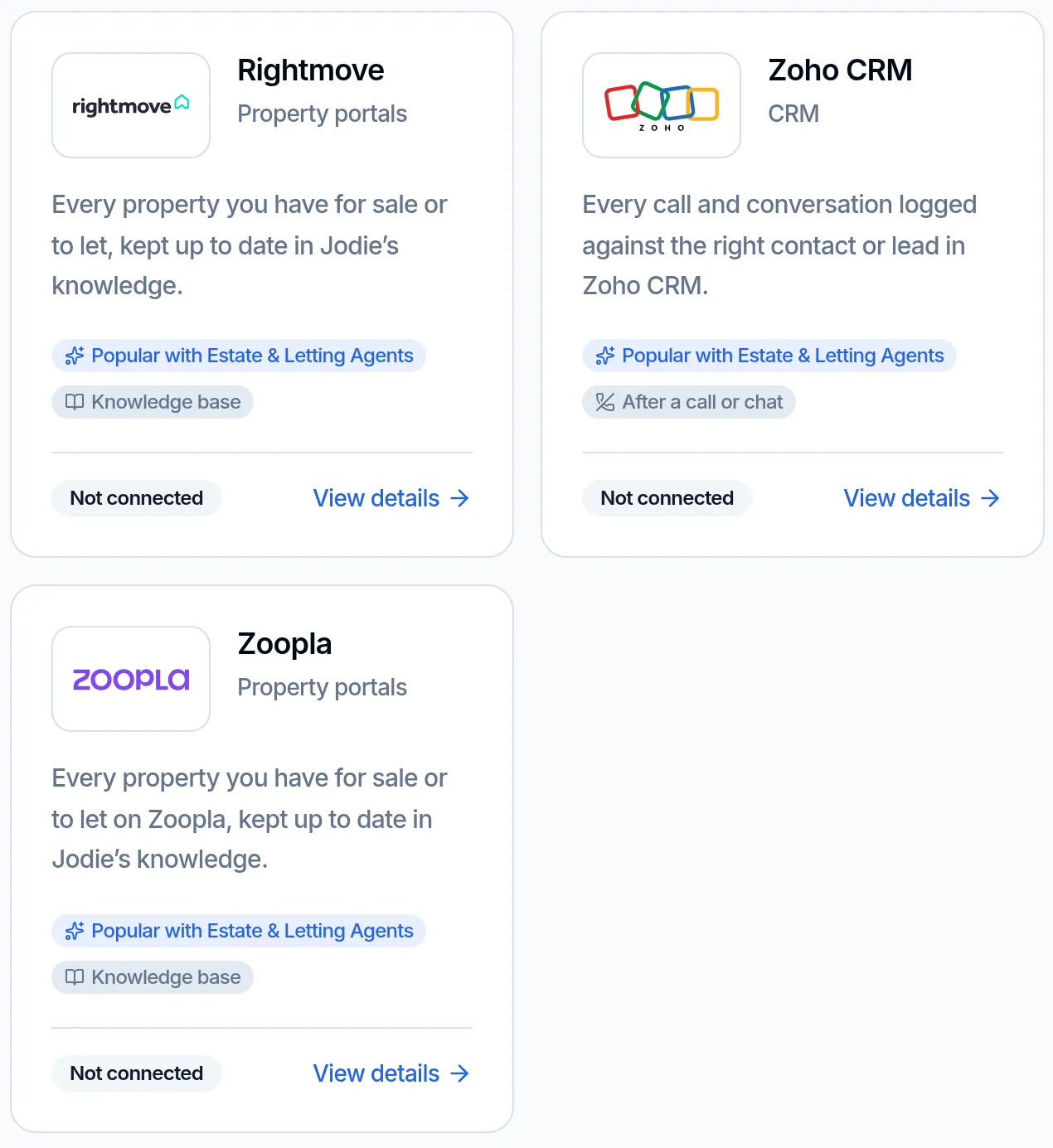
Find Zoopla in Integrations
Open Integrations in Jodie. Zoopla sits under Property portals, next to Rightmove.
- 02
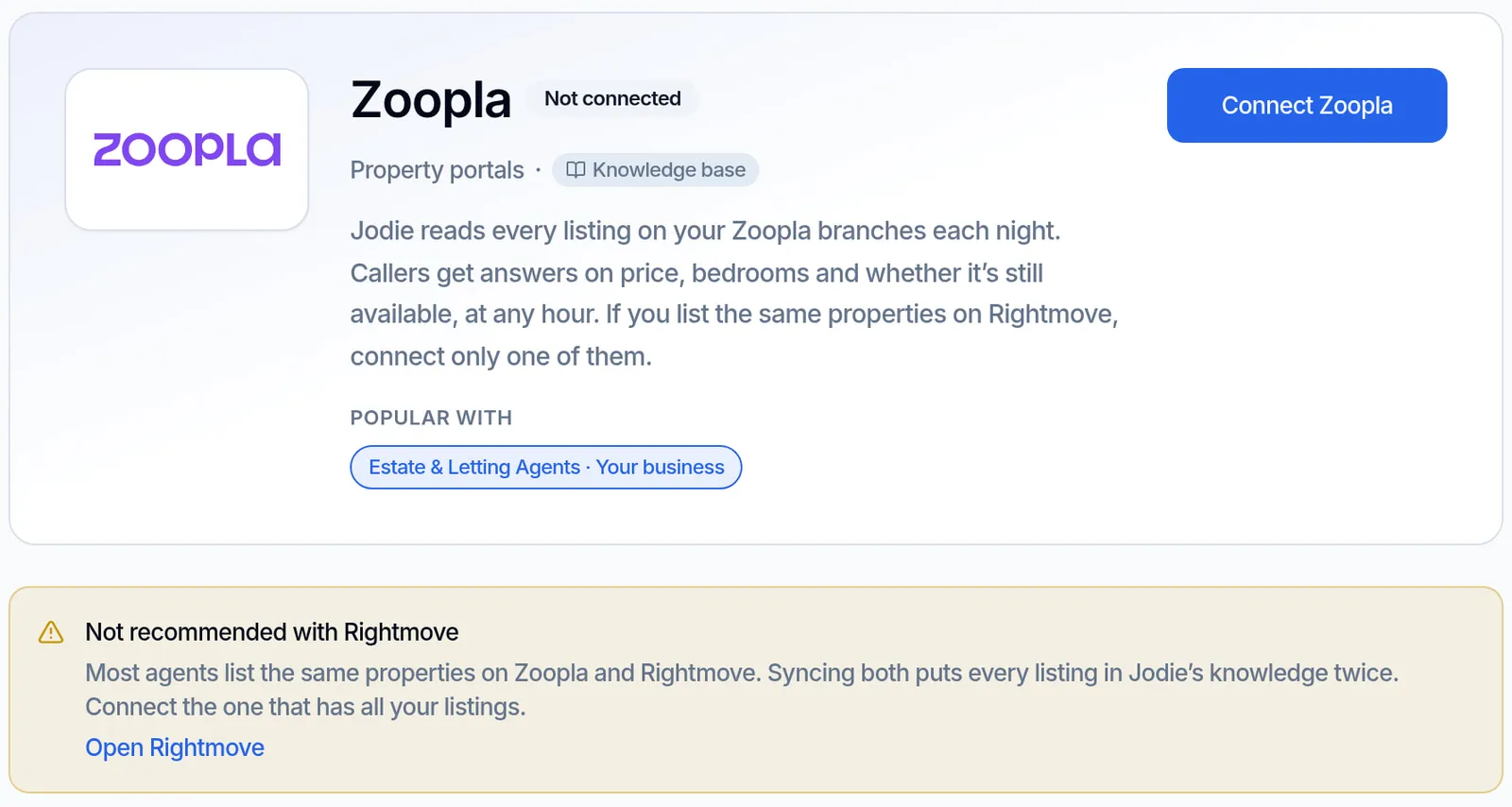
Open the Zoopla page
The Zoopla page says what Jodie reads. A note says not to run it with Rightmove. Click Connect Zoopla to start.
- 03
Find your branch
Click "Find your branch on Zoopla". Search for your agency and open your branch page. Copy the whole address, then click Continue.
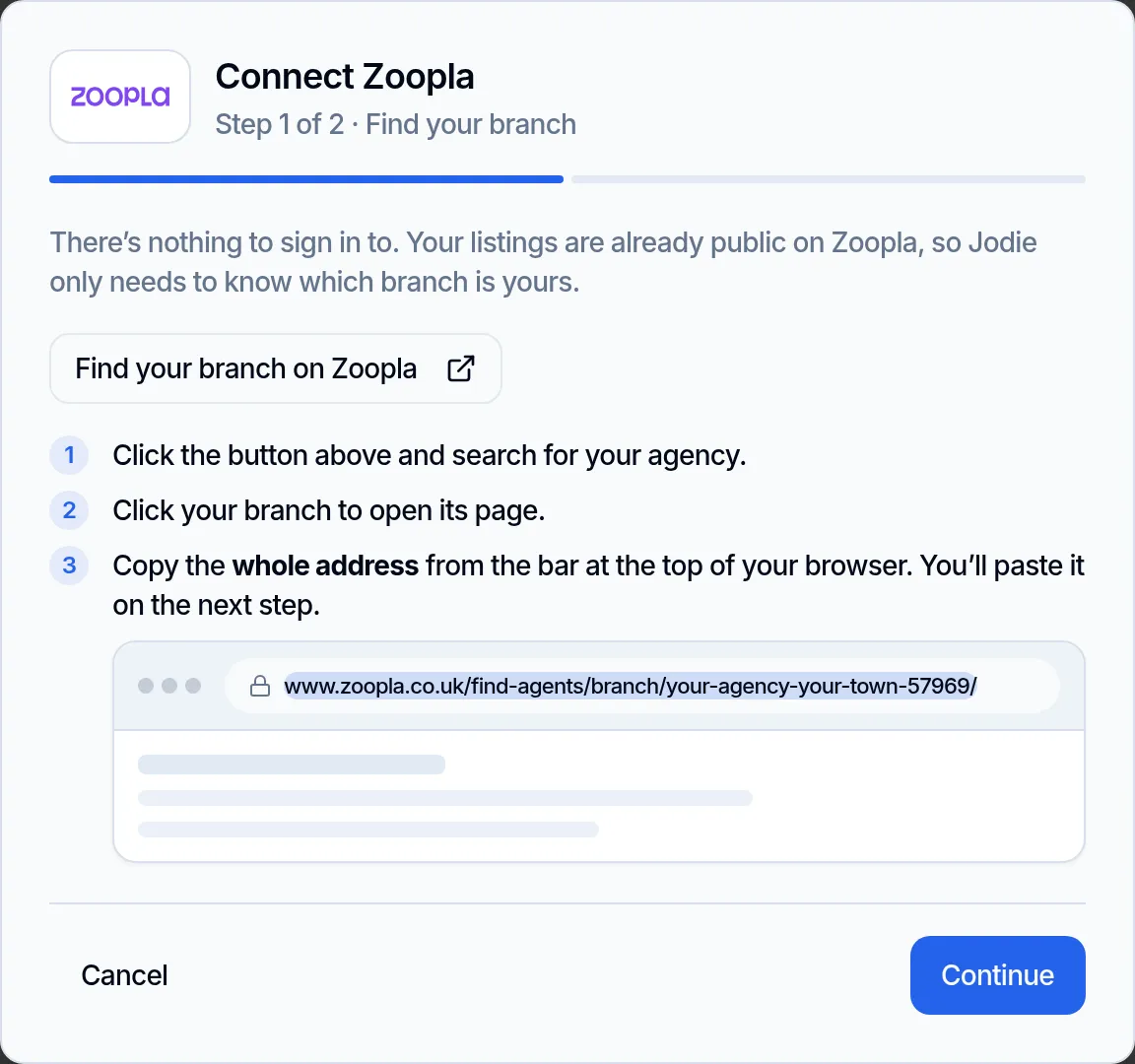
- 04
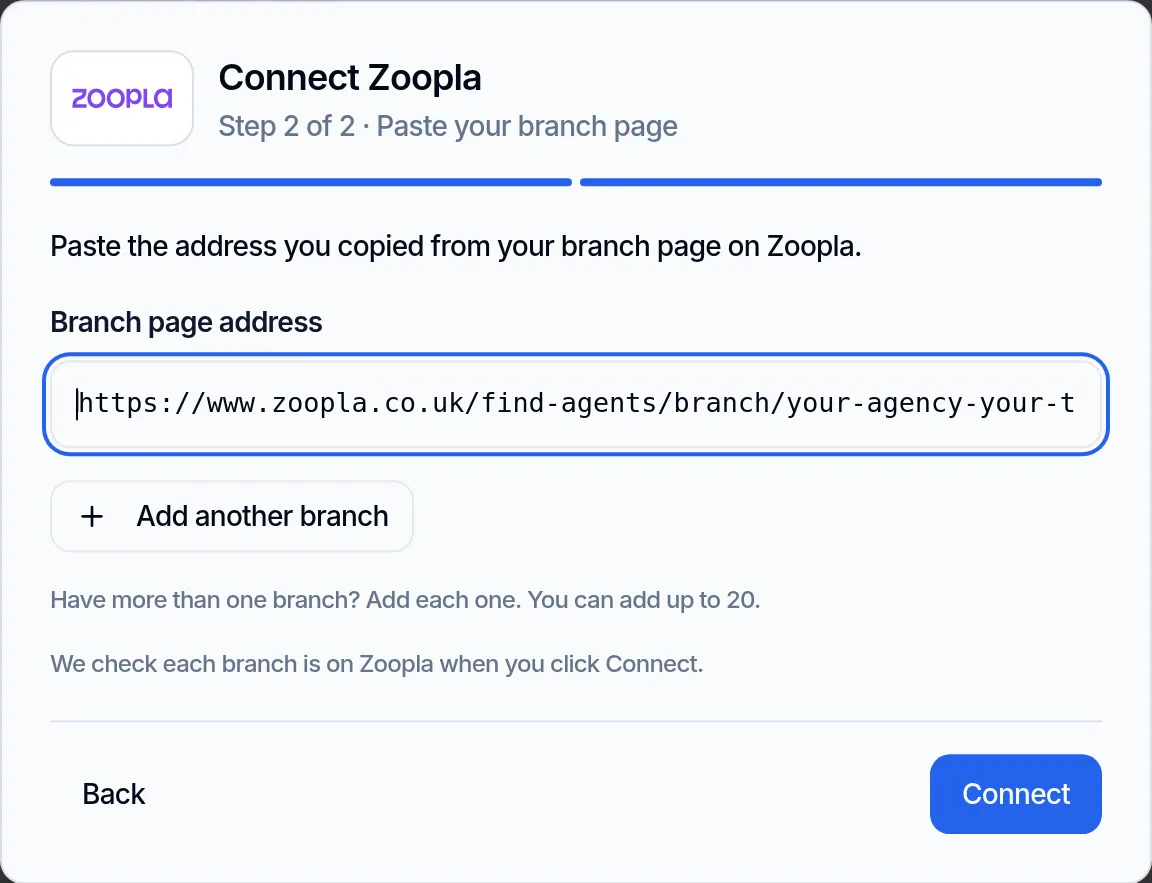
Paste the address
Paste the address of each branch, up to 20. Click Add another branch for more. Jodie checks each one is on Zoopla when you click Connect.
- 05
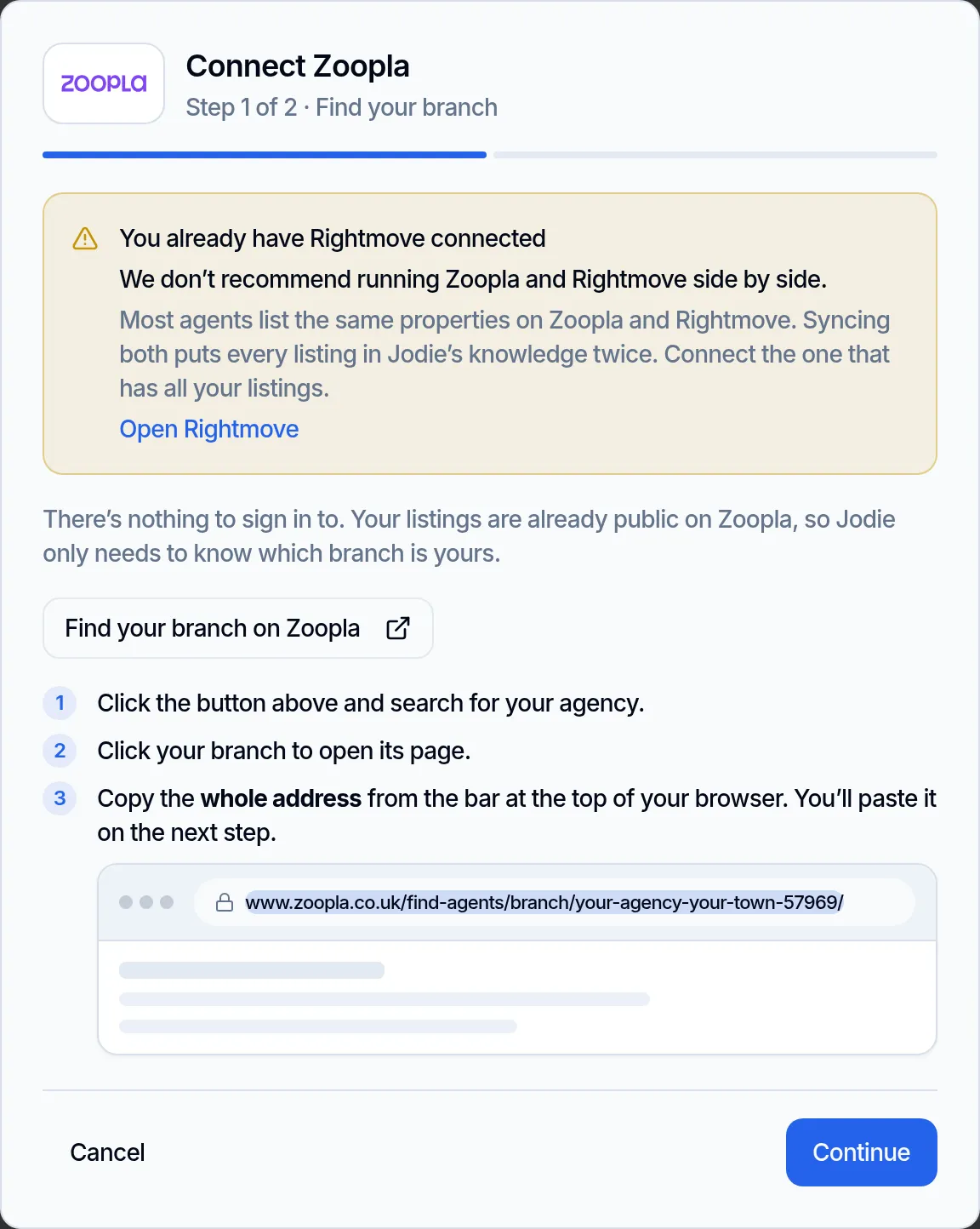
Already on Rightmove?
If Rightmove is connected, Jodie warns you first. Syncing both puts every listing in her knowledge twice. Connect the one that has all your listings.
What data is used and stored?
Jodie only reads listings you have already made public on Zoopla. She only reads the branches you add.
Read from Zoopla
- The sales, lettings or both on the branches you add, as you choose
- The details on each listing, as shown above
- Read when you connect, every night at about 3am, and when you click Refresh now
Kept in Jodie
- Your branch numbers, the number at the end of each branch page address
- Whether she reads sales, lettings or both
- Your listings, as one document in her knowledge
- Listings that have not changed are not read again
- All of it is forgotten as soon as you disconnect
Never stored or touched
- A login, password or API key. There is none to give
- Anything written to Zoopla
- Descriptions, photos and floor plans
- Agent contact details
- Anything about buyers or tenants, such as leads or messages
- Listings from branches you have not added
Why connect Zoopla?
Portal calls come in when the office is shut. Jodie can answer them properly.
- 01
Real answers at 9pm
Buyers browse Zoopla in the evening. Jodie tells them if it is available and what it costs. Then she takes the viewing request.
- 02
Today's listings
Read every night, so Jodie knows what is under offer or sold STC. Click Refresh now after a busy day.
- 03
Nothing to type up
No list of listings to keep in Jodie by hand. Put it on Zoopla and she knows it after the next read.
- 04
Warmer leads
Callers who are told yes, it is available, and here is the price, leave their details. Callers told "we will call back" ring the next agent.
- 05
Sales and lettings
Jodie reads both, including let agreed and the date a let is free. Only sell or only let? Choose just the one you need.
- 06
Set up in a minute
Paste your branch page address and connect. There is no login to share.
Best AI receptionist for Zoopla agents
The best AI receptionist for estate agents on Zoopla knows your live listings. Most callers ring about a property they just saw on Zoopla. If the receptionist cannot see that listing, it can only take a message.
Jodie reads every sale and letting on your Zoopla branches each night. So when someone calls about a flat on your branch page, she knows the price, the status and the bedrooms. Then she takes their details for a viewing.
-
Knows each listing
She knows the address, price, status, type, bedrooms, bathrooms, tenure and key features of every property you list.
-
Ready for tenants too
For homes to let, she also knows the date each one is free and whether it comes furnished.
-
No login to share
Jodie only needs the address of your public branch page. She never asks for a Zoopla login, password or API key.
-
Ready in about a minute
Paste your branch page address and Jodie reads your listings straight away. You can add up to 20 branches.
Zoopla vs Rightmove: which one should Jodie read?
Rightmove and Zoopla are the two big property portals in the UK. Most agents list the same homes on both. So for Jodie, picking Zoopla or Rightmove is simple.
Connect the portal that has all your listings. One is usually enough. If you connect both, every listing shows up twice in her knowledge. Jodie warns you if you try.
-
Same answers either way
Jodie reads the same facts from both portals: price, status, bedrooms, tenure and more. Callers get the same answer from either one.
Zoopla AI and Jodie: what is the difference?
Zoopla AI usually means the AI tools on Zoopla's own site, such as its AI search for homes. They help home hunters find a property. They do not answer your agency's phone.
Jodie is not part of Zoopla, and Zoopla does not endorse her. She is an AI receptionist for your agency. She reads the listings already public on your branch pages, then uses them to answer the people who call you.
The two can work one after the other. A buyer finds your flat on Zoopla, then rings your office. Jodie answers, tells them about it and takes their details for a viewing.
AI for estate agents and letting agents on Zoopla
Estate agents use AI for lots of jobs, from writing details to sorting leads. The phone is where a slow reply costs the most. A caller who gets no answer may ring the next agent on Zoopla.
A plain estate agent answering service takes a message. Jodie answers every call in your agency name. She can also answer the question, because she knows your Zoopla listings.
-
Sales, lettings or both
Jodie reads sales and lettings. If you only sell or only let, she reads just the one you choose.
-
Under offer and sold STC
She knows the status of each property, so callers hear the truth about what is still on the market.
Zoopla questions
Is there an AI receptionist that works with Zoopla?
Yes. Jodie is an AI receptionist that knows every listing on your Zoopla branches. She reads every sale and letting each night. Callers get real answers on price, status and bedrooms at any hour. She uses them on WhatsApp, email and web chat too.
Is this the same as Zoopla's AI search?
No. Zoopla's AI tools help home hunters search on its site. Jodie answers your agency's phone, and uses your listings to answer callers.
Is Jodie made by Zoopla?
No. Jodie is not part of Zoopla, and Zoopla does not endorse her. She reads the listings that are already public on your own branch pages.
Do I need a Zoopla login or API key?
No. There is nothing to sign in to. Jodie reads only public listing pages on Zoopla, the same ones buyers see. She only needs the address of your branch page. She never asks for a login, password or API key.
How do I find my branch page address?
Search for your agency on Zoopla and open your branch page. Copy the address from your browser. It ends in your branch number, such as zoopla.co.uk/find-agents/branch/your-agency-london-57969/. You can add up to 20 branches. Jodie keeps only the number.
Should I connect Zoopla and Rightmove?
Usually one is enough. Connect the portal that has all your listings. Most agents list the same homes on both. If you connect both, every listing is in her knowledge twice. Jodie warns you if you try.
Which properties does Jodie know about?
Every sale and letting on the branches you add, including under offer, sold STC and let agreed. For each one she knows the address, price, status, type, bedrooms, bathrooms, tenure and up to 3 key features. For lettings, she also knows the date it is free and the furnishing. You can choose sales, lettings or both.
How up to date is Jodie?
She reads your branches as soon as you connect. Then she reads them every night at about 3am, your time. You can also click Refresh now at any time. Listings that have not changed are not read again.
Where do my listings show up in Jodie?
On your Training page, as one document marked "Synced from Zoopla" with a lock. You cannot edit or delete it there. You manage it from the Zoopla page in Jodie.
Does it put leads into Zoopla?
No. Nothing is ever written to Zoopla. Jodie only reads your listings so she can answer callers. To log calls in your CRM, connect Jodie to your CRM as well.
Which Jodie plan do I need?
Professional or above. It is not on the Basic plan.
How do I disconnect?
Click Disconnect on the Zoopla page in Jodie. She forgets your listings straight away. Nothing changes on Zoopla.